Articles by "MT6592"
Showing posts with label MT6592. Show all posts
Droidadda is one of worlds best online blogging portal where latest trending articles on Android,Blogging,Seo,Gadgets,Tricks,etc are daily published.

MoKee Open Source is the biggest non-profit Android Open Source development team in China, with members from all parts of the world. We follow the latest development from Google closely and improve various parts of Android according to the user habits. Being a non-profit organisation, we utilise our spare time and own funds to keep this passion alive. Therefore, the costs for the forum and servers are solely beared by us. In order to provide a good user experience, we only included a few preinstalls in the ROM. Along with the advertisements in the forum; we hardly get enough to pay for the bandwidth. The point is, those are our only source of income, however many developers choose to exclude them when releasing unofficial builds. Unlike CyanogenMod, we did not accept monetary help at the early stages, as in China, most people do not understand the meaning of “making a donation”. They would think of it as buying a service, which is conflicting with our objectives. Anyways, we still made it until today, and even started to provide third party developers a chance to utilise our OTA system. All of these are the fruit of our hard work and passion. We are proud of the happy users, and we are also proud of the support given to MoKee Open Source. Most importantly, we are proud of the improvements we have achieved all these while, and the advancements never stop.

Whats Working

  • Camera
  • Video Recording
  • Audio in calls
  • Bluetooth
  • USSD
  • Audio
  • Mic
  • RIL
  • SMS (Receive and Send both working)
  • WiFi
  • Data
  • RIL is now more stable
  • Dual SIM
  • Gapps
  • Hotspot
  • Screen Recording
  • Both storages (SD and Internal) mounting in both Phone and PC
  • Gapps
  • 720P working in youtube

Rom Changelogs

  • 2G/3G Fixed
  • Data 3G Working
  • Fixed Autorotation
  • Fixed Usual Sensors
  • Fixed Hotspot
  • Fixed Multiple Shots on Camera
  • Fixed Youtube 720p
  • Fixed GPS Fixed
  • Fixed Vídeo recoding
  • Smooth UI
  • Expanded Swap Ram in Boot
  • Audio Quality Improved
  • Added Battery Doze
  • Fixed FM (Source)
  • Fixed Mounting Issues
  • Emulated Storage

    Downloads

    Download the Most stable Mokee M 6.0.1 For Xolo Omega 5.5 ever from the below link along with several files.

    Mokee M    Gapps

    Screenshots

    Flashing Instructions

    • Download Rom and copy to SD Card
    • Reboot into TWRP Recovery
    • Go to Wipe Option in TWRP
    • Go to Advanced Format option
    • Choose cache ,Data ,System and Dalvik cache partition and swipe for Formatting.
    • Flash ROM wait until finish.
    • First time boot after flashing takes time. Please be Patienced.

    Credits

    • MrRajsingh111
    • Liquid Porting And Development
    • Ferhung
    • Fire855
    • Tribetmen [2G-3G,Data After Reboot Fix]
    • Manjunath Yashu
    • Raj Kumar

    Final Words

    Note: The installation process of this new ROM is going to take a while. Also, the first boot process should take at least 10 minutes before it loads all the new files.
    Link For You:  For More Custom Roms Visit here. If you need any extra help completing this guide, then you should tell us in comments. If installation fails, then the only thing that you need to do is to try and repeat the whole tutorial more than once.

    Google Search Tags:

    Mokee M Rom, Mokee M Rom For Mediatek, Mokee M Rom For Xolo, Mokee M Rom For Xolo Omega 5.5, Mokee M Rom For MT6592, Mokee M Rom For MTK, Unofficial Mokee M Rom, Mokee M Rom For Android, Mokee M Rom Crossported Rom For MT6592, Pure Mokee M Rom For Mediatek


    Also Read: Official Lineage OS 15 For Android Devices
    Share this article with your friends and do let them know about this amazing article and I hope they will love it and love to install it on their device. Thank you for visiting Droidadda and keep visiting for more tips and tricks like this and I will meet you in the next article. Till then stay peace.
    Droidadda is one of worlds best online blogging portal where latest trending articles on Android,Blogging,Seo,Gadgets,Tricks,etc are daily published.

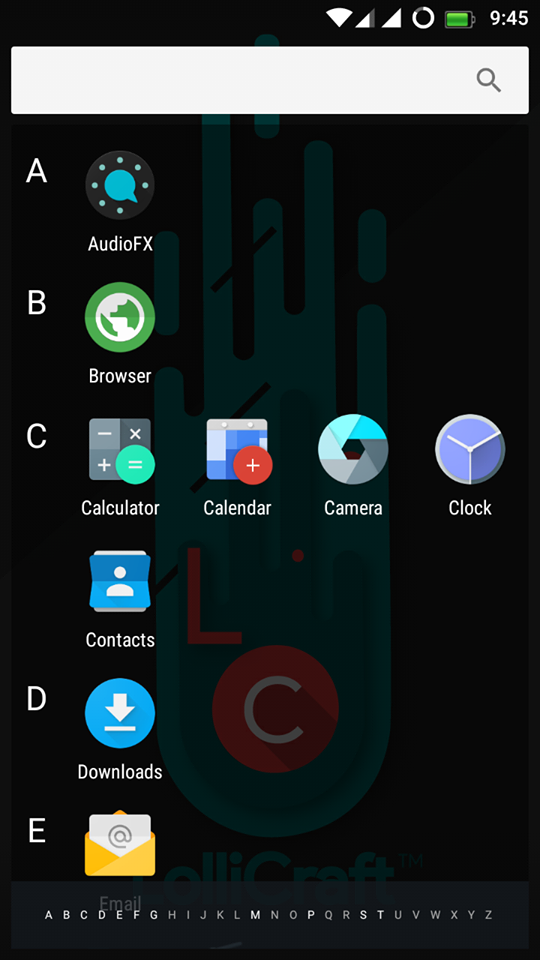
    LolliCraft L is Lollypop based Rom (5.1.1) which is developed by Rahul Sehgal. It is totally Materialized and themed Lollipop Rom. The ROM is Unofficialy made for Xolo Omega 5.5 (MT6592). Do not flash the ROM directly in any other device. You need to port it first to your device, else your device might be bricked or will be stuck on bootloop then I will not be responsible for any damage that will happen to your device.

    /*
    ** Your warranty is now not void.
    **
    ** We are not responsible for bricked devices, dead SD cards, thermonuclear
    ** war, or you getting fired because the alarm app failed. Please do some*
    ** research if you have any concerns about features included in this ROM
    ** before flashing it! YOU are choosing to make these modifications, and if
    ** you point the finger at us for messing up your device, we will laugh at you.
    **
    **/

    Rom Features

    Main Interface
    • Customizations
    • Theme Chooser
    • Misc
    Statusbar
    • Clock Customizations
    • Battery Settings
    • Battery Bar
    • Carrier Label
    • Statusbar Logo
    • Dynamic Engine (Para****)
    • Network Traffic Meters
    • And Many More
    Recents
    • Search Bar Switch
    • RAM Memory Bar
    • Clear all button (position , icon , animation and color)
    • Hidden Apps
    • Extra Styles
    • Show clock and date
    • Immersive Recents
    • 2 Alt. Recents
    • Etc.
    LockScreen
    • Visualizer
    • Weather
    • Shortcuts
    • Wallpaper
    • Etc
    Notification Panel
    • Notifications
    • Panel Transparency Sh*ts
    • Number of QS rows
    • Number of QS tiles per row
    • Tile Animation and Style + Duration and Interpolator
    • Brightness Slider and ICON
    • Omni Header
    • Font Style
    • QS Logo
    • And some extra miscs.
    Blur UI
    • Expanded Blur
    • Notification BG Blur
    • Header Blur
    • QS Blur
    • Recents Blur (Requires Restart UI)
    Triggers
    • Gesture Anywhere
    • Oppo 3finger SS
    • App Circle Bar
    • PA Pie Control
    • Halo (Experimental)
    NavBar
    • DU Nav Resizer with Nav Enabler
    • NB: Requires UI Restart

    Screenshots

    Downloads

    Download the Most stable Lollycraft L 5.1.1 For Xolo Omega 5.5 ever from the below link along with several files.

    Lollycraft L    Gapps

    Flashing Instructions

    • Download Rom and copy to SD Card
    • Reboot into TWRP Recovery
    • Go to Wipe Option in TWRP
    • Go to Advanced Format option
    • Choose cache ,Data ,System and Dalvik cache partition and swipe for Formatting.
    • Flash ROM and wait until finish.
    • First time boot after flashing takes time. Please be Patienced.

      Credits

      • MrRajsingh111
      • Raj Kumar
      • Team LC
      • Rahul

      Final Words

      Note: The installation process of this new ROM is going to take a while. Also, the first boot process should take at least 10 minutes before it loads all the new files.
      Link For You:  For More Custom Roms Visit here. If you need any extra help completing this guide, then you should tell us in comments. If installation fails, then the only thing that you need to do is to try and repeat the whole tutorial more than once.

      Google Search Tags:

      Lollycraft L Rom, Lollycraft L Rom For Mediatek, Lollycraft L Rom For Xolo, Lollycraft L Rom For Xolo Omega 5.5, Lollycraft L Rom For MT6592, Lollycraft L Rom For MTK, Unofficial Lollycraft L Rom, Lollycraft L Rom For Android, Lollycraft L Rom Crossported Rom For MT6592, Pure Lollycraft L Rom For Mediatek

      Also Read: Official Lineage OS 15 For Android Devices
      Share this article with your friends and do let them know about this amazing article and I hope they will love it and love to install it on their device. Thank you for visiting Droidadda and keep visiting for more tips and tricks like this and I will meet you in the next article. Till then stay peace.
        Droidadda is one of worlds best online blogging portal where latest trending articles on Android,Blogging,Seo,Gadgets,Tricks,etc are daily published.

        Hey Everyone ! Today i'm presenting you one of the best custom ui based rom "Samsung Galaxy S7 Marshmallow ui". Which is an after market copied device rom. It has all the features like official Samsung Galaxy S7. But the main difference is that it is not official firmware.
        Lets discuss some of the features of this rom !
        Disclaimer: All the custom ROMs and firmwares, official software updates, tools, mods or anything mentioned in the tutorial belong to their respective owners/developers. We (www.droidadda.org) or the developers are not to be held responsible if you damage or brick your device. We don’t have you on gun point to try out this tutorial.

        Features

        • Added Clear Motion
        • Added Dynamic Statusbar
        • Added Gesture Anywhere
        • Added Partition Info
        • Added HeadsUp
        • Added S7 Music App
        • SMS app is more like S7
        • Dialer app is more like S7
        • Contacts app is more like S7
        • Added Original Samsung Keyboard
        • Added settings tab view option
        • Recent apps is more like S7
        • Added S7 Ringtones,Notifications
        • Added Ripple Animations
        • Volume panel is more like S7
        • Added Advanced Reboot Menü
        • Added Pac Screen Recorder
        • Added S7 Sound Recorder
        • Added StayOS Font changer
        • Added S7 Bootanimation
        • Added autostarts
        • Added carrier label in statusbar
        • Clock app is more like S7
        • Added clock options
        • Added screenshot delete button on screenshot saved notification
        • Added S7 Browser
        • Added S7 2x1 Weather
        • Added Multiwindow menu but no open two apps on screen
        • Added S7 Edge Screen
        • Added Toolbox
        • Added Adblocker
        • Added Internet Speed Meter
        • Added Galaxy Evolution Store
        • Added CPU Control
        • Fixed application installation problems.
        • Changed ICONS
        • Fixed youtube
        • Added Marshmallow animations.
        • Fixed root
        • Changed lockscreen sounds.
        • Best battery backup and performance

        Bugs

        • Fake Storage
        • Fake Ram Management

          Downloads


          Download the Most stable Samsung S7 rom For Xolo Omega 5.5 ever from the below link along with several files.

          Samsung S7    Gapps

          Sound Patch    IMEI Fix

          Screenshots


          Flashing Instructions

          • Download Rom and copy to SD Card
          • Reboot into TWRP Recovery
          • Go to Wipe Option in TWRP
          • Go to Advanced Format option
          • Choose cache ,Data ,System and Dalvik cache partition and swipe for Formatting.
          • Flash ROM and wait until finish.
          • First time boot after flashing takes time. Please be Patienced.

          Final Words

          Note: The installation process of this new ROM is going to take a while. Also, the first boot process should take at least 10 minutes before it loads all the new files.
          Link For You:  For More Custom Roms Visit here. If you need any extra help completing this guide, then you should tell us in comments. If installation fails, then the only thing that you need to do is to try and repeat the whole tutorial more than once.

          Google Search Tags:

          Dirty Unicorns, Dirty Unicorns For Mediatek, Dirty Unicorns For Xolo, Dirty Unicorns For Xolo Omega 5.5, Dirty Unicorns For MT6592, Dirty Unicorns For MTK, Unofficial Dirty Unicorns, Dirty Unicorns For Android, Dirty Unicorns Crossported Rom For MT6592, Pure Dirty Unicorns For Mediatek, Samsung Clone Rom, Samsung S7 Clone Rom, Samsung S7 Official Clone Rom For MT6592

          Also Read: Official Lineage OS 15 For Android Devices
          Share this article with your friends and do let them know about this amazing article and I hope they will love it and love to install it on their device. Thank you for visiting Droidadda and keep visiting for more tips and tricks like this and I will meet you in the next article. Till then stay peace.
          Droidadda is one of worlds best online blogging portal where latest trending articles on Android,Blogging,Seo,Gadgets,Tricks,etc are daily published.

          Dirty Unicorns is a project that started out with no name. It was a project that was first based off AOKP back in the early days of Jelly Bean. In the early days -- it was just a one man show on one device, the EVO 3D. Since then, many others have joined the project and it has grown exponentially.

          We have seen a lot of talent contribute to this project of ours. Big or small, the focus was always on contributing to the community. That is ultimately why we do what we do. After Jelly Bean, we decided to move to a new base, OmniROM. While AOKP was fun, OmniROM proved to be even more exciting base because it challenged us to see what we could do with a project that had different goals in mind. We learned a lot and gained contributors in the process. With Lollipop, we moved to an AOSP base with a lot of patches from CAF to make our older devices function as they should. We grew further with experience and learned a lot more along the way.

          It has been an awesome learning experience and it's still not over! We are still learning, striving to grow each day, and continuing to move forward. Lastly, weDO NOT accept, nor ask, for donations. We do not believe in that. Everything that is necessary to keep this project going comes out of our own pocket. Gerrit, Jenkins, Websites, Devices, etc. We will never ask for a dime. All that we do ask is that you have patience, search for answers prior to posting, read, and try to enjoy the process with us!!

          Disclaimer: All the custom ROMs and firmwares, official software updates, tools, mods or anything mentioned in the tutorial belong to their respective owners/developers. We (www.droidadda.org) or the developers are not to be held responsible if you damage or brick your device. We don’t have you on gun point to try out this tutorial.

          Whats Working?

          • Camera working
          • Video rec working via Camu app
          • No Need to reboot for apps to apear in app drawer
          • Hotspot Fixed
          • FM fixed
          • Data working
          • 1080p playback in gallery fixed
          • Youtube 720p fixed
          • Youtube live playback fixed
          • No Sim fixed
          • No Network drop found
          • USSD Fixed
          • Autorotation Fixed
          • All sensors working
          • After Reboot QuickSetiings Too
          • Rest Are As CM13
          • Too many features
          • GPS fixed completely

          Bugs:

          • Bluetooth

          Downloads

          Download the Most stable Dirty Unicorns 6.0.1 For Xolo Omega 5.5 ever from the below link along with several files.

          Dirty Unicorns    Gapps

          Screenshots 

          Flashing Instructions

          • Download Rom and copy to SD Card
          • Reboot into TWRP Recovery
          • Go to Wipe Option in TWRP
          • Go to Advanced Format option
          • Choose cache ,Data ,System and Dalvik cache partition and swipe for Formatting.
          • Flash ROM and wait until finish.
          • First time boot after flashing takes time. Please be Patienced.

          Credits

          • Mrrajsingh111
          • Pedro P Darkkiller(MT6580-3.18.19)
          • Ahmed Rahmy
          • Rock1234
          • Avtiotaon Atn Ntr
          • Estahad MriduL(MT6580-3.18.19)
          • CM team
          • Manjunath Yashu[Fixed Bugs]
          • Karthick [For Lava Iris X8]

          Final Words

          Note: The installation process of this new ROM is going to take a while. Also, the first boot process should take at least 10 minutes before it loads all the new files.
          Link For You:  For More Custom Roms Visit here. If you need any extra help completing this guide, then you should tell us in comments. If installation fails, then the only thing that you need to do is to try and repeat the whole tutorial more than once.

          Google Search Tags:

          Dirty Unicorns, Dirty Unicorns For Mediatek, Dirty Unicorns For Xolo, Dirty Unicorns For Xolo Omega 5.5, Dirty Unicorns For MT6592, Dirty Unicorns For MTK, Unofficial Dirty Unicorns, Dirty Unicorns For Android, Dirty Unicorns Crossported Rom For MT6592, Pure Dirty Unicorns For Mediatek

          Also Read: Official Lineage OS 15 For Android Devices
          Share this article with your friends and do let them know about this amazing article and I hope they will love it and love to install it on their device. Thank you for visiting Droidadda and keep visiting for more tips and tricks like this and I will meet you in the next article. Till then stay peace.