Articles by "Custom Roms"
Showing posts with label Custom Roms. Show all posts
Droidadda is one of worlds best online blogging portal where latest trending articles on Android,Blogging,Seo,Gadgets,Tricks,etc are daily published.

AIM ROM is based on Lineage OS. Our aim is to present to you a combination of unmatched stability,performance,battery life,customization and sets of useful features that are picked by our team and testers. We ensure that the sweet taste of latest Android essence stays in your device. The aim of our project is to provide multiple features in android devices with no bugs. If you are looking for a better and stable ROM then you have come to right place.

ROM Features:

Status Bar

  • Superuser indicator on/of
  • Network Traffic indicators
  • Custom Carrier Label
  • Custom Statusbar icons
  • Brightness Control
  • Double-Tap On Status bar to Sleep

Interface

  • Dark/Light Theme
  • Custom Density settings
  • Media cover art on/off
  • Quick settings on lockscreen on/off
  • More..!!

Button

  • Live volume
  • Hardware Key Configuration
  • Power Menu Configuration
  • Advanced reboot
  • FIngerprint vibration
  • Fingerprint keystore unlock
  • More..!!

Mischellaneous

  • Alarm blocker
  • System app remover 
  • Screenshot Sound
  • More..!!

ROM & Device Info

Device
Micromax A106
Android
Nougat 7.1.2
Kernel
3.10.107
Chipset
MT6582

Screenshots


Download


Download the AIM Rom built for Micromax A106 (Unite 2) with the latest & stable Kernel 3.10.107 from the link given below:

How to flash?

  • Wipe Data , Cache , Dalwik Cache
  • Flash Rom
  • Flash Gapps(optional) 
  • If You Get An Error While Flashing Rom ,
  • ignore it
  • Reboot & Enjoy

How to Root?

  • Go To Setting & click on About
  • Tap on Build Number 7 Times to enable Developer option.
  • Open the Developer Option
  • Click on Root Access & select Apps Only
  • Done...!!

Final Words

This was the article on [ROM] [7.1.2] [MT6582] [WAKEMOD] AIM OS  FOR  MICROMAX UNITE 2 A106. I hope you'll like this article. If you need any extra help completing this guide, then you should tell me in comments. If installation fails, then the only thing that you need to do is to try and repeat the whole tutorial more than once.

Google Search Tags:

Android Nougat update for Micromax Unite 2, Android Nougat update for Micromax A106, Android Nougat Rom for Micromax A106, Android Nougat Rom for Micromax Unite 2, AIM Rom for Micromax Unite 2, MT6582 Nougat Roms, Android Nougat Rom for Mediatek, Android Nougat Rom for MT6582, Nougat Rom for MT6582
Thankyou for visiting Droidadda. For fast access to our service Bookmark & Subscribe us now. Share this article with your friends. If any issues then feel free to comment below. Peace out.
Droidadda is one of worlds best online blogging portal where latest trending articles on Android,Blogging,Seo,Gadgets,Tricks,etc are daily published.

LineageOS 14.1 is a custom ROM made by Lineage OS team, a group of Android enthusiasts who earlier developed CyanogenMod ROM and the Cyanogen OS. Lineage OS 14.1 is based on Android Nougat (Android 7.1.1) features over stock Android Nougat, as always. I will try to list out all the additional features here when it will be available.
LineageOS is a free, community built, aftermarket firmware distribution of Android 7.1.1 (Nougat), which is designed to increase performance and reliability over stock Android for your device.

This page is dedicated to maintain the available download links of Lineage OS 14.1 (Android Nougat) ROMs available till date, just like we had the Lineage OS 14.1 list of devices and the Lineage OS 13 list of devices. For now this page may not have a great list count of Lineage 14.1 ROMs accumulating for all the available devices but eventually this list will grow bigger and bigger. Just stay tuned to this post if you want the latest Lineage OS 14.1 ROM for your Android device. It is not guaranteed that your device will get an update of LineageOS 14.1 but you can hope for the best. Always !!

/*
* Your warranty is now void.
*
* I am not responsible for bricked devices, dead SD cards,
* thermonuclear war, or you getting fired because the alarm app failed. Please
* do some research if you have any concerns about features included in this ROM
* before flashing it! YOU are choosing to make these modifications, and if
*/
* you point the finger at me for messing up your device, I will laugh at you.

Whats Working:

  • Hardware acceleration
  • RIL for SMS/Calls/Internet
  • GPS
  • WiFi
  • Vibration
  • Audio
  • Bluetooth / A2DP
  • MTP and Mass Storage mode
  • External SD
  • Camera (Videos & Photos)
  • Gestures
  • All Sensors
  • Tethering
  • USB Otg
  • mBack button!
  • LiveDisplay (natively smooth)
  • Zram (with LZ4 comp.)
  • Signed build (user/release-keys)
  • Security Patch September 2017

Not Working/Bugs:

  • Camera
  • Bluetooth
  • Speaker

Screenshots

Downloads

Download the Most stable Mokee M 6.0.1 For Xolo Omega 5.5 ever from the below link along with several files.

LOS 14.1   Gapps

    Flashing Instructions

    • Download Rom and copy to SD Card
    • Reboot into TWRP Recovery
    • Go to Wipe Option in TWRP
    • Go to Advanced Format option
    • Choose cache ,Data ,System and Dalvik cache partition and swipe for Formatting.
    • Flash ROM wait until finish.
    • First time boot after flashing takes time. Please be Patienced.

    Credits

    • MrRajsingh111
    • Liquid Porting And Development
    • Ferhung
    • Fire855
    • Tribetmen [2G-3G,Data After Reboot Fix]
    • Manjunath Yashu
    • Raj Kumar

    Final Words

    Note: The installation process of this new ROM is going to take a while. Also, the first boot process should take at least 10 minutes before it loads all the new files.
    Link For You:  For More Custom Roms Visit here. If you need any extra help completing this guide, then you should tell us in comments. If installation fails, then the only thing that you need to do is to try and repeat the whole tutorial more than once.

    Google Search Tags:

    Lineage OS 14.1 Rom, Lineage OS 14.1 Rom For Mediatek, Lineage OS 14.1 Rom For Xolo, Lineage OS 14.1 Rom For Xolo Omega 5.5, Lineage OS 14.1 Rom For MT6592, Lineage OS 14.1 Rom For MTK, Unofficial Lineage OS 14.1 Rom, Lineage OS 14.1 Rom For Android, Lineage OS 14.1 Rom Crossported Rom For MT6592, Pure Lineage OS 14.1 Rom For Mediatek, Lineage OS Nougat Rom


    Share this article with your friends and do let them know about this amazing article and I hope they will love it and love to install it on their device. Thank you for visiting Droidadda and keep visiting for more tips and tricks like this and I will meet you in the next article. Till then stay peace.
    Droidadda is one of worlds best online blogging portal where latest trending articles on Android,Blogging,Seo,Gadgets,Tricks,etc are daily published.

    MoKee Open Source is the biggest non-profit Android Open Source development team in China, with members from all parts of the world. We follow the latest development from Google closely and improve various parts of Android according to the user habits. Being a non-profit organisation, we utilise our spare time and own funds to keep this passion alive. Therefore, the costs for the forum and servers are solely beared by us. In order to provide a good user experience, we only included a few preinstalls in the ROM. Along with the advertisements in the forum; we hardly get enough to pay for the bandwidth. The point is, those are our only source of income, however many developers choose to exclude them when releasing unofficial builds. Unlike CyanogenMod, we did not accept monetary help at the early stages, as in China, most people do not understand the meaning of “making a donation”. They would think of it as buying a service, which is conflicting with our objectives. Anyways, we still made it until today, and even started to provide third party developers a chance to utilise our OTA system. All of these are the fruit of our hard work and passion. We are proud of the happy users, and we are also proud of the support given to MoKee Open Source. Most importantly, we are proud of the improvements we have achieved all these while, and the advancements never stop.

    Whats Working

    • Camera
    • Video Recording
    • Audio in calls
    • Bluetooth
    • USSD
    • Audio
    • Mic
    • RIL
    • SMS (Receive and Send both working)
    • WiFi
    • Data
    • RIL is now more stable
    • Dual SIM
    • Gapps
    • Hotspot
    • Screen Recording
    • Both storages (SD and Internal) mounting in both Phone and PC
    • Gapps
    • 720P working in youtube

    Rom Changelogs

    • 2G/3G Fixed
    • Data 3G Working
    • Fixed Autorotation
    • Fixed Usual Sensors
    • Fixed Hotspot
    • Fixed Multiple Shots on Camera
    • Fixed Youtube 720p
    • Fixed GPS Fixed
    • Fixed Vídeo recoding
    • Smooth UI
    • Expanded Swap Ram in Boot
    • Audio Quality Improved
    • Added Battery Doze
    • Fixed FM (Source)
    • Fixed Mounting Issues
    • Emulated Storage

      Downloads

      Download the Most stable Mokee M 6.0.1 For Xolo Omega 5.5 ever from the below link along with several files.

      Mokee M    Gapps

      Screenshots

      Flashing Instructions

      • Download Rom and copy to SD Card
      • Reboot into TWRP Recovery
      • Go to Wipe Option in TWRP
      • Go to Advanced Format option
      • Choose cache ,Data ,System and Dalvik cache partition and swipe for Formatting.
      • Flash ROM wait until finish.
      • First time boot after flashing takes time. Please be Patienced.

      Credits

      • MrRajsingh111
      • Liquid Porting And Development
      • Ferhung
      • Fire855
      • Tribetmen [2G-3G,Data After Reboot Fix]
      • Manjunath Yashu
      • Raj Kumar

      Final Words

      Note: The installation process of this new ROM is going to take a while. Also, the first boot process should take at least 10 minutes before it loads all the new files.
      Link For You:  For More Custom Roms Visit here. If you need any extra help completing this guide, then you should tell us in comments. If installation fails, then the only thing that you need to do is to try and repeat the whole tutorial more than once.

      Google Search Tags:

      Mokee M Rom, Mokee M Rom For Mediatek, Mokee M Rom For Xolo, Mokee M Rom For Xolo Omega 5.5, Mokee M Rom For MT6592, Mokee M Rom For MTK, Unofficial Mokee M Rom, Mokee M Rom For Android, Mokee M Rom Crossported Rom For MT6592, Pure Mokee M Rom For Mediatek


      Also Read: Official Lineage OS 15 For Android Devices
      Share this article with your friends and do let them know about this amazing article and I hope they will love it and love to install it on their device. Thank you for visiting Droidadda and keep visiting for more tips and tricks like this and I will meet you in the next article. Till then stay peace.
      Droidadda is one of worlds best online blogging portal where latest trending articles on Android,Blogging,Seo,Gadgets,Tricks,etc are daily published.

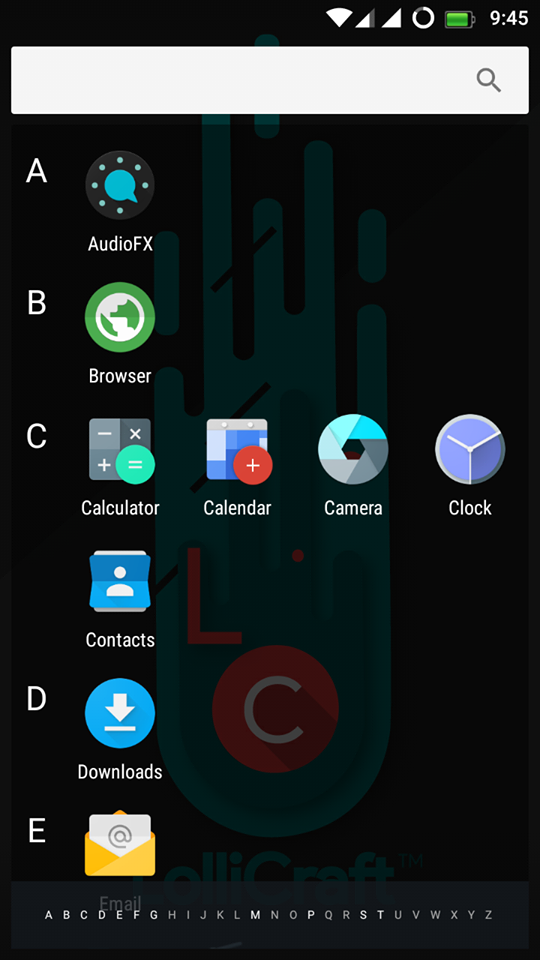
      LolliCraft L is Lollypop based Rom (5.1.1) which is developed by Rahul Sehgal. It is totally Materialized and themed Lollipop Rom. The ROM is Unofficialy made for Xolo Omega 5.5 (MT6592). Do not flash the ROM directly in any other device. You need to port it first to your device, else your device might be bricked or will be stuck on bootloop then I will not be responsible for any damage that will happen to your device.

      /*
      ** Your warranty is now not void.
      **
      ** We are not responsible for bricked devices, dead SD cards, thermonuclear
      ** war, or you getting fired because the alarm app failed. Please do some*
      ** research if you have any concerns about features included in this ROM
      ** before flashing it! YOU are choosing to make these modifications, and if
      ** you point the finger at us for messing up your device, we will laugh at you.
      **
      **/

      Rom Features

      Main Interface
      • Customizations
      • Theme Chooser
      • Misc
      Statusbar
      • Clock Customizations
      • Battery Settings
      • Battery Bar
      • Carrier Label
      • Statusbar Logo
      • Dynamic Engine (Para****)
      • Network Traffic Meters
      • And Many More
      Recents
      • Search Bar Switch
      • RAM Memory Bar
      • Clear all button (position , icon , animation and color)
      • Hidden Apps
      • Extra Styles
      • Show clock and date
      • Immersive Recents
      • 2 Alt. Recents
      • Etc.
      LockScreen
      • Visualizer
      • Weather
      • Shortcuts
      • Wallpaper
      • Etc
      Notification Panel
      • Notifications
      • Panel Transparency Sh*ts
      • Number of QS rows
      • Number of QS tiles per row
      • Tile Animation and Style + Duration and Interpolator
      • Brightness Slider and ICON
      • Omni Header
      • Font Style
      • QS Logo
      • And some extra miscs.
      Blur UI
      • Expanded Blur
      • Notification BG Blur
      • Header Blur
      • QS Blur
      • Recents Blur (Requires Restart UI)
      Triggers
      • Gesture Anywhere
      • Oppo 3finger SS
      • App Circle Bar
      • PA Pie Control
      • Halo (Experimental)
      NavBar
      • DU Nav Resizer with Nav Enabler
      • NB: Requires UI Restart

      Screenshots

      Downloads

      Download the Most stable Lollycraft L 5.1.1 For Xolo Omega 5.5 ever from the below link along with several files.

      Lollycraft L    Gapps

      Flashing Instructions

      • Download Rom and copy to SD Card
      • Reboot into TWRP Recovery
      • Go to Wipe Option in TWRP
      • Go to Advanced Format option
      • Choose cache ,Data ,System and Dalvik cache partition and swipe for Formatting.
      • Flash ROM and wait until finish.
      • First time boot after flashing takes time. Please be Patienced.

        Credits

        • MrRajsingh111
        • Raj Kumar
        • Team LC
        • Rahul

        Final Words

        Note: The installation process of this new ROM is going to take a while. Also, the first boot process should take at least 10 minutes before it loads all the new files.
        Link For You:  For More Custom Roms Visit here. If you need any extra help completing this guide, then you should tell us in comments. If installation fails, then the only thing that you need to do is to try and repeat the whole tutorial more than once.

        Google Search Tags:

        Lollycraft L Rom, Lollycraft L Rom For Mediatek, Lollycraft L Rom For Xolo, Lollycraft L Rom For Xolo Omega 5.5, Lollycraft L Rom For MT6592, Lollycraft L Rom For MTK, Unofficial Lollycraft L Rom, Lollycraft L Rom For Android, Lollycraft L Rom Crossported Rom For MT6592, Pure Lollycraft L Rom For Mediatek

        Also Read: Official Lineage OS 15 For Android Devices
        Share this article with your friends and do let them know about this amazing article and I hope they will love it and love to install it on their device. Thank you for visiting Droidadda and keep visiting for more tips and tricks like this and I will meet you in the next article. Till then stay peace.