Articles by "Mods"
Showing posts with label Mods. Show all posts
Droidadda is one of worlds best online blogging portal where latest trending articles on Android,Blogging,Seo,Gadgets,Tricks,etc are daily published.

There are many hidden features available in official WhatsApp application. But to turn on those options you need to do editing in shared pref folder in your WhatsApp application root directory.
Now, there are several codes to turn every option in WhatsApp instead you can use WA Tweak application to enable those feature and the code will be automatically written in that file. You don’t need to do anything.

This application is off just 3.8 MB and it is having various features in which you can install new emoji in your WhatsApp application. There are some bugs in this application but in future release, those bugs will be solved soon.
WA Tweak only customize and edits your Official WhatsApp. If you want to edit GBWhatsApp then you can’t do it. There is an inbuilt package of WhatsApp is fit in WhatsApp.

What is Chmod?

There is explicit permission given to the applications. About the application features which should be hidden or which features should be shown to the users.
Now, whenever WhatsApp receives the beta update at that time some specific permission are hidden and to unlock those feature WA tweaks application is used to unlock those hidden features.
Chmod777 permission is used to unlock those settings in WhatsApp. You can enable those features using ApkTool to decompile the WhatsApp and then you can change the permission of the application.

What is WA Tweaks?

WA Tweaks is the Android application which will help you to unlock the hidden feature of WhatsApp and then you can check the newly added features. There is a different tricks available to unlock those feature of WhatsApp which is different from other application, and you need to force stop this application. The developer of WA Tweaks regularly checks the WhatsApp and see to it that is there any new feature available in WhatsApp? If yes then the application is updated.

This application is updated daily you can bookmark our site to receive the regular updates it is simple and easy. The size of the application is just 3.8 MB and which can do a lot of tweaks with the WhatsApp and it works in the rooted Android device. This application is only supported in official WhatsApp this application is not supported by any other mods such as GBWhatsApp, WhatsApp prime or WhatsApp Plus which is having the different package name. WA Tweaks checks the package name of the application which helps to configure the correct WhatsApp application.

You can enable and disable the application features in just some clicks and then you don’t need to worry about anything if you don’t like the feature of anything. The best thing about this application is that it doesn’t consume too much memory. This application is just of 8 MB and does a lot of tasks in just some clicks which is amazing and needed for any application. There are no mods available which help you to customise your official WhatsApp but with the aid of Xposed framework you can do so with just some clicks, and you don’t need to do more settings in the application. You can also change the Emoji of your WhatsApp. If you are bored with the old emoji of WhatsApp, then you can install iOS 10 emoji on your phone. There are many features which can be done.

WA Tweeks Features

There are amazing features of the application which will help you to edit many settings in the application and just some clicks. There is a lot of tweaks available in which some of them can be found on WhatsApp, and some of them are yet to come which is great.
  • Updated daily and supports to the latest version of WhatsApp.
  • Less in size just around 8 MB and doesn’t consume too much memory.
  • You can also enable Group Invite Link if it is not pre-activated.
  • Enable mentions which help you to call a specific user in the WhatsApp group.
  • You can also enable Multicast.
  • Enable the new Photo editor of WhatsApp which will help you to edit the pictures before sending to anyone on WhatsApp.
  • Enable the new Home user interface which will allow users to check out the all new user interface which is going to come on WhatsApp.
  • You can also select the contact which was not available in the official WhatsApp.
  • You can also enable GIF Search which helps you to search for the GIF in the emoji tab and will allow in just one click.
  • Enable the all-new internal Video player which supports you if you are not having the video player on your phone.
  • You can also set the limit of sending the images and videos and increase it as much you need.
  • You can increase the documents sending limit to 999 MB.
  • Resize the emoji packer size as much as you need it.
  • Send the full resolution photo on WhatsApp which was compressed.
  • Backup and Restore the chats in just some clicks no need of registering on WhatsApp again and again.
  • Install all the new emoji of WhatsApp and Android Nougat 
  • Android 7.1 Ready which allows activating 3D touch is Android API Level 25
  • No internet connection required
  • Vcard indexing
  • Track location of your friends in any WhatsApp group.
  • Unsend send messages
  • Disable status feature
  • Enable the new info feature of WhatsApp
  • You can now send any files using WhatsApp 
  • Much more.

    Limitations:

    • Root Needed to customize your WhatsApp.
    • Some features like Settings of Application doesn’t works properly.

    Downloads

    Download WA Tweaks 2.5.9 Latest Version Apk For Android 2017 from the links mentioned below:


    Software Name                               WA Tweaks
    Last Updated August 14, 2017
    Android Version Requires 4.0+
    Total Downloads 1,000,000+
    App Size 3.8 MB
    Developer Alex193a
    Main Task Enable Hidden Features of WhatsApp

    Installation Steps

    • Be a part of Whatsapp Beta Tester Programme. Click here to join now.
    • Install the application and you might get unknown source warning.
    • Go to settings and check unknown sources. Turn on the option.
    • Now, Install it once again and Now open the application.
    • Grant the permission for Root and then you are done.
    • Enable all the features which you need to enable in WhatsApp.
    • You can also customize WhatsApp easily swiping the menu from left.

    Related Video:

    Final Words

    This way you can Download WA Tweaks Latest Version Apk For Android 2017. I hope you love this application. Enable all the tweaks and enjoy editing your WhatsApp. Thank you for visiting and keep visiting for more tips and tricks.
    Also Read: How To Send Large Files on Whatsapp (Above 1GB)
    Thankyou for visiting Droidadda. For fast access to our service Bookmark & Subscribe us now. Share this article with your friends and show how they can customize WhatsApp. If any issues then feel free to comment below. Peace out.
    Droidadda is one of worlds best online blogging portal where latest trending articles on Android,Blogging,Seo,Gadgets,Tricks,etc are daily published.

    Download Latest GBWhatsapp 5.80 Apk For Android

    Introduction

    WhatsApp has become one of the most used applications of this era. Just because of its functionality and its simplicity. WhatsApp is been used by many peoples this is the reason why many people are coming up with their own WhatsApp application. Today we are going to discuss GBWhatsApp Latest Version.

    WhatsApp was launched in 2007 and when WhatsApp was giving free of charge service in which they said you just need the internet and you can send your WhatsApp messages to everyone. At that time SMS were the biggest trend in which you chat with people in some cents or Rupees. When WhatsApp came in the market it was something people checked that you can send images on WhatsApp and it is cross platform here the WhatsApp trend became high and because of the cross platform it was used by thousands of peoples. This is the reason why SMS marketing came down. Till now WhatsApp is been used by million of peoples.

    This is something amazing fact and the second best thing is that there are billions of peoples using WhatsApp free for lifetime.

      GBWhatsApp Apk Download Latest Version

      GBWhatsApp is one of the best application which is having a good and amazing functionality. In which you can install dual WhatsApp application on your Android device easily with the help of GBWhatsApp. GBWhatsApp is becoming popular day by day because of the different package name and functionality of theming and etc.

      Also Read: How to send large files on Whatsapp above 1GB
      GBWhatsApp is having a different package name so that you can easily use dual application. It doesn’t conflict with the old WhatsApp you can use both the application at the same time. The developer of GBWhatsApp make sure that GBWhatsApp should give the best security and service which is given by the original WhatsApp and this is something make GBWhatsApp unique.
      GBWhatsApp has come up with the theming feature in which you can create your own WhatsApp theme and apply on your WhatsApp. If you think you have created something very good then you can even send your theme to the developers of GBWhatsApp. All this feature are good but the next exciting feature of GBWhatsApp is that you can even freeze your last seen, second tick and blue ticks.


      You don’t need an external application lock because GBWhatsApp comes with their inbuilt lock functionality that locks your WhatsApp application every time when you minimise or do some other settings. You can even change the application logo colour just because might be you get a confusion about your real and GBWhatsApp so WhatsApp has come up with this unique feature. When you copy any messages on WhatsApp you don’t get an issue about the text is copied with sender name and time. You don’t need to copy the messages with the sender name text with GBWhatsApp.

      There are many third party applications available on many sites which are not working or else they are not having the direct download links. Many of the sites are having fake download buttons and other stuff which are something irritating. You can bookmark our site for the latest version and update of your GBWhatsApp and you don’t need to wait for your download just one click and your file will be automatically downloaded. Let’s discuss more features of GBWhatsApp given below.

      Features

      • Freeze last seen, hide blue ticks and second ticks and much more.
      • You can even create your own theme and send it to the developer.
      • Customize your application logo and notification bar.
      • You can also colourize the status bar and nav bars easily.
      • Don’t open your chats every time to check the person is online or not. Just open the application and you will get a toast notification.
      • Status limit increased to 255 characters instead of 139 and that too server site.
      • Send above 90 images at one time instead of 10 images.
      • You can also send video above 16 MB on GBWhatsApp.
      • You can add up to 600 peoples in broadcast list.
      • No ban issues use as much as you can. ( I am using from 6 months no such issues).
      • Support voice calls and you can disable calls too.
      • A different server of themes from which you can download different type of themes.
      • Change style of blue ticks and messages.
      • You can create your own iOS type theme for GBWhatsApp.
      • Counter statistics of group which shows, which person has send how many messages.
      • You can preview media without downloading in your device.
      • Show your WhatsApp status always online.
      • You can hide date, time and contact name while copying the text.
      • Always updates available of the GBWhatsApp.
      • There is a small message showing that your message is broadcast message or normal text.
      • You can click on the status and the message will be copied into your clipboard.
      • You can copy specific text in the message. You don’t need to copy full text and edit it.
      • You can also hide specific message of groups and chats.
      • You can check your friends last seen from the main screen.
      • You can send any kind of doc files using GBWhatsApp.
      • No root required.
      • Much more…

      Whats New in GBWhatsapp v5.80

      • New Updated Base to 2.17.223 (Playstore)
      • Super Exclusive Message Scheduler (Open Options on Main Screen & Select Message Scheduler)
      • Added in Exclusive Way Ability to Change Fonts (App Size Remains the Same as We have made it Online for Selecting Fonts) (Mod 11) (For first time, it will take bit time)
      • Exclusive Toast When Anyone Views your Status/Story (Mod 2.5.8)
      • Ability to send multiple videos at the same time
      • Added Doodle (Now add edit pics with emojis & text) when choose pic from Gallery
      • Updated Now Status/Story will directly download when click on download
      • Added View all Status as a list (go to Status Tab and click Options)
      • Added Option to Change Mention Color in Chat Screen (Mod 1.2.58)
      • Added Option to Change Mention Color on Main Screen (Mod 2.2.36)
      • Added Option to Change Color of Broadcast List when Forward Msg (Mod 2.4.15)
      • Added Option to Change Color of Broadcast Icon (Mod 1.2.59)
      • Added Option to Change Color of Unread Message in Chat Screen (Mod 1.2.59 to Mod 1.2.61)
      • Fixed WAMOD Entry Style
      • Other Fixes…

      App Info & Details

        InformationDetails
        Software NameGBWhatsapp
        Version5.80
        Last UpdatedAugust 1, 2017                        
        Android Version4.0+
        Total Downloads15 Million+
        App Size34.4 mb
        DeveloperGB Mods
        FeaturesWhatsapp & Whatsapp+ Features
        Package Namecom.gbwhatsapp
        We are going to mention today some of the sites which are updated whenever a new application update is available. It is easy and you can also download the application in some clicks. We are mentioning here Google Drive links so that you can enjoy unlimited and fastest downloads. If any of the links is not working then you can simply shoot a comment below and I will surely help out. This application doesn’t conflict with original WhatsApp and no ban issues so use this application. You won’t get any issues. If yes feel free to comment below.

        Also Read: Whatsapp Bot : Auto Responder Virtual Assistant Robot

        Downloads

        Download the latest GBWhatsapp Apk for your Android device from the below links now.


        How to install GBWhatsapp ?

        • Now, simply open the application and you might get unknown source warning.
        GBWhatsApp Latest Version
        • Click on settings and allow unknown sources.
        GBWhatsApp Latest Version
        • Now, open the application and click on install.
        GBWhatsApp Latest Version
        • Now, open the application and then click on Agree And Continue.
        GBWhatsApp Latest Version
        • Now, enter your mobile number and click on “OK”
        GBWhatsApp Latest Version
        • After that verify your number via OTP code and click on next and enter your name and profile picture.
        GBWhatsApp Latest Version
        • Again click on next and then you are almost done. Then you have successfully completed the signup process of GBWhatsApp.
        • Now, click on menu and GB Settings and then start your editing of your WhatsApp.
        GBWhatsApp Latest Version

        Final Words

        In this, you can easily download the application and check all the tutorials. If you face any difficulty feel free to comment below. If you think update is available for the application is available we will update the post. Make sure you bookmark our post in your browser. This was the article about GBWhatsApp Download Apk.
        Also Read: How to Enable Chat Heads For Messanger Apps
        Thank you for visiting and keep visiting for more tips and tricks like this and I will meet you in the next one and as always peace out. If you like this article share it among your friends.
        Droidadda is one of worlds best online blogging portal where latest trending articles on Android,Blogging,Seo,Gadgets,Tricks,etc are daily published.

        Counter Terrorist 2 is an amazing Action/Shooting &Missionary game for Android. This game has more features and changelogs as compared to the previous version. The official game community has committed several changes as per the demands of their users and modded this game for a bette experience while playing. This game has a high end graphics which you can see when you play this game. It has amazing collection of weapons, armors and teams.

        Changelogs v2.0

        • You can turn "Auto Shoot" ON/OFF in battle.
        • You can modify "Aim Sensitivity" in pause button.
        • More weapons, in 2.0 we have 20 weapons, some are really the "Monsters":)
        • More levels, in 2.0 we added 2 more levels which contain gorgeous environment.
        • More smart enemies, in 2.0 we will face much smarter enemies, you'd better not despise them.
        • Harder level means more rewards.

        Game control

        • Left 1/3 screen is for moving,right 2/3 screen is for aiming.
        • When you aim the target,your weapon will fire automatially,giving you a much easier FPS game control.
        • You can prepare your bullets before battling,or auto buy bullet in the battle.

        Game tips

        1. You can tweak your control sensivity in your pause menu,fit all the android devices here.
        2. Auto buying bullets in the battle,save your precious time
        3. Aim the head,give your enemy the critical strike!
        4. Enemies' life and damage grows when you select a harder level..Enjoy!

        What's New in this version ?

        • Fixed "Flying in sky" bug.
        • Fixed "Gun disappear" bug.
        • Fixed "Hell mode level not moving to next" bug.

        Screenshots


        Downloads

        You can download this game from the below link along with its Mod and Data. To download the files please select the desired link given below:


        Final Words

        This was the article on World War Heroes v1.1 Game for Android. I hope you'll like this article. If you need any extra help completing this guide, then you should tell me in comments. If installation fails, then the only thing that you need to do is to try and repeat the whole tutorial more than once.
        Thankyou for visiting Droidadda. For fast access to our service Bookmark & Subscribe us now. Share this article with your friends and show how they can customize WhatsApp. If any issues then feel free to comment below. Peace out.
        Droidadda is one of worlds best online blogging portal where latest trending articles on Android,Blogging,Seo,Gadgets,Tricks,etc are daily published.
        WhatsApp is the biggest messaging application which helps us to chat with our friends, family and our relatives. Nowadays many of them are searching for an app to decrypt the data of WhatsApp. They can know what they are doing exactly. We won’t be sharing the way to spy on your friends but we will tell you the way to create fake WhatsApp conversation on your Android.

        If you are interested in creating the fake conversation and prank your friends then you can download an application which is called as WhatsFake. Download this application from Play store and it will help you to create your own fake conversation of WhatsApp.

        WhatsFake is having the same user interface as that of WhatsApp which will help you to create the fake conversation with your friends and amazing play store ratings. You can send the new emoji and create the fake conversation anytime you want and it is totally free.

        Fake Whatsapp conversation for Android 2017

          Create Fake WhatsApp Conversation on Android

          You can easily create fake WhatsApp conversation. There are the shortcut keys to take the screenshot of the chats and they will be shocked. You can change the status of the text message and set the last seen also add the profile picture to any chat and change the author of the message.

          Also Read: How To Send Large Files on WhatsApp (Above 1GB)
          When you will create the fake WhatsApp conversation you don’t need a rooted device. There are some ads in the application but in the main conversation screen you won’t find any ads and this is the most important part of creating a fake conversation of WhatsApp.
          There are a number of apps which help you to create the fake WhatsApp conversation but they are not working anymore just because of too many bugs and they are not maintained and updated anymore.
          Note: This Application Is Just For Fun Purpose Only

          How to Create Fake WhatsApp Conversation on Android

          • Download WhatsFake application from here: Play Store.
          • Open the application and Green floating button to create the fake conversation.
          Fake Whatsapp Conversation for Android 2017
          • Click on the Contact Name and change the details and last seen of that message.
          Fake Whatsapp conversation for Android 2017
          • That’s it! Click the back button and save the details. If you need you can also apply the profile picture.
          • Whenever you will write the message you will get an option. You can select it and choose whether it is receiver message or sender.
          Fake Whatsapp conversation for Android 2017
          • Take a screenshot and send it to your friends.

          Hidden Features

          • Change content of Message
          • Change Receiving Time of Message
          • Read All Messages without appearing online on WhatsApp
          Pros
          • You can easily modify the Messages without any issues
          • Simple User interface
          • Read all the messages without appearing online on WhatsApp
          • You can also change the chats of groups
          Cons
          • Requires Root Access
          • Sometimes this application crashes

          Minumum Requirements

          • Official WhatsApp – WhatsApp Download
          • WhatsHack Application – Download
          • Make sure that you have backed up the data of WhatsApp
          • Rooted Android mobile phone – Root Your Android Mobile Easily Without PC [Updated]

          How To Modify WhatsApp Messages Using WhatsHack

          • Make sure that you have completed all the above requirements before proceeding to next step
          • You have to back up your WhatsApp chats by going into Settings > Chats and Calls > Backup Chats
          • Now After backing up WhatsApp chats open the WhatsHack application and Press at the logo to allow root access in your device
          Fake Whatsapp conversation for Android 2017
          • After allowing the root access you will see several chats available on the application.
          Fake Whatsapp conversation for Android 2017
          • Now, Open the chat conversation whichever you want to modify it
          Fake Whatsapp conversation for Android 2017
          • After that click on chat of the person and click on Modify. If you want to modify the group you can also do that easily by clicking on group
          Fake Whatsapp conversation for Android 2017
          • After modifying it close the WhatsHack application and check the chats of yours and you can easily send him screenshots of the chats.
          Fake Whatsapp conversation for Android 2017

          Working Proof

          • Original Chat Conversation:
          Fake Whatsapp conversation for Android 2017
          • Chat Conversation After Modification via WhatsHack:
          Fake Whatsapp conversation for Android 2017

          Trouble-shooting

          • Whenever WhatsHack crash try clearing the data of WhatsHack and try again
          • Getting error in assessing chat database make sure you have back up the data and then try again

          Final Words

          This was the tutorial on Whatsapp Fake Chat Conversation. I hope you'll like this tutorial. If you need any extra help completing this guide, then you should tell me in comments. If installation fails, then the only thing that you need to do is to try and repeat the whole tutorial more than once.
          Also Read: How To Chat With Anyone on WhatsApp Without Saving Number


          Thankyou for visiting Droidadda. For fast access to our service Bookmark & Subscribe us now. Share this article with your friends and show how they can customize WhatsApp. If any issues then feel free to comment below. Peace out.
          Droidadda is one of worlds best online blogging portal where latest trending articles on Android,Blogging,Seo,Gadgets,Tricks,etc are daily published.

          Hello Fellas, Today i'm here to reveal an awesome and beautiful theme for Android devices. This theme is only supported in Miui Rom. It can be bupported by all versions of Miui (Russia, China, Global). This theme has all the features of IOS 10 UI. Amazing Design and  Attractive Interface makes this theme one of the best in its class.

          As iOS devices looks beautiful with the stock icon theme by default and you might be bored using same default Android theme of your device so it’s time to give some refreshment to theme Miui devices. Using this theme you can customize your android devices running Miui 8 with number of icons, docks, badges, UI, folders, bootlogo and more. All these iOS user interface or Winterboard are compatible with all Miui supported devices running Miui 8 or later which helps your devices look amazingly beautiful.

          Changelogs

          • Redesign Statusbar Transparent
          • Battrey Charge Animation on Lock Screen
          • Changed name app (iTunes,Safari,T.store,iCloud,iMessage)
          • Few More

          Theme Features

          This theme supports all the features of iOS 10 UI. It has designed for the build in Miui devices to feel the features like a pro. Following are the several description about this theme:
          All the features listed below are themes alike iOS 10.2 user interface.
          • Lockscreen
          • Control Center
          • Notification Panel
          • SystemUI, Home
          • Mi Space>
          • New Framework>
          • Caller UI
          • Settings>
          • Dialer Screen
          • Boot Animation
          • Ringtones
          • Fonts
          • Launcher
          • Many more to discover.

          Downloads

          Download the iOS 10.2 premium theme for Miui 7/8 all versions from the below link. Additional files are also listed as Fonts & Wallpapers
          Click below to download Themes according to your screen resolution.

          Theme 720P Theme 1080P 

          Other Modes related to this Theme

          Video Player Mod

            iOS 10 Boot Animation

          720P 1080P

            Apple Boot Logo

          Mediatek 1080P

            Qcomm 720P Qcomm 1080P

          Also you can download other version of Real iOS 10.2 v2.1 theme from the link below

          Screenshots


          Final Words

          This was the article on iOS 10.3 Premium Theme for Miui 7/8. Now, without any issues, you can explore the features with your friends using this Theme. I hope you like this article. If you face any issues feel free to comment below. 
          Thank you for visiting Droidadda and keep visiting for more tips and tricks and Android articles. Share this article among your friends to aware most of your friends about this trick.
          Droidadda is one of worlds best online blogging portal where latest trending articles on Android,Blogging,Seo,Gadgets,Tricks,etc are daily published.

          SUPER TWEEKS V2.0 FOR ANDROID

          Hello Friends ! Today i am presenting you one of the best Modded script for Android. This script is based on various Tweeks including Performance, Battery life, Stability, Rendering, Netwibes, Gaming, Ram & many more. By installing this mod you will feel the power of Super Tweeks in your device. Let's discover some of the features in this mod. 

          Introduction

          Mod powerful that boosts your device's performance. It improves your device's performance along with improving battery life of your phone .
          SUPER TWEEKS is made for those who like to do high multitasking or those who love to play HD games on their device.
          This mod will work on any device. All you need to ensure is that your phone is running android.
          It doesn't matter which ROM, which version, which device etc. It runs on any rooted device running on Android 2.3+

          Features:

          • Life expectancy of the improved battery
          • Incredible improved management of your Ram
          • Improved management of networks
          • Optimized overall performance
          • Protection against ADS with ADSuper
          • Battery calibration
          • Google Play Fix Battery Drain
          • Cleaning system every boot
          • Super Entropy
          • Flags Tuner
          • FSTim
          • And Many More To Discover 😉
          Also Read: Download & Install Samsung S8 Edge Music Player on Any android

          MINIMUM REQUIREMENTS (BEFORE FLASHING THIS MOD)

          • A rooted device with init.d support is required to run this mod which is pretty much common these days, so your device should be compatible to this mod . The installation of the mod is quite simple as it’s a flashable Zip that can be flashed using any custom recovery. So all you need to do is to download the Mod file from the download link provided below and flash it via a custom recovery.
          • Rooted phone
          • Device Kernel / ROM with init.d support ( If No support : Init.d Support ) 
          • 10MB free in system
          • Custom recovery (CWMR, TWRP, Philz, CarlivTouch)
          • Terminal Emulator (Link)

          How To Install Super Tweeks?

          Note: Before Flashing please do a Nandroid backup to avoid any incompatibility issues.
          • Do not use with any other Mod script or apps improvement because they conflict.
          • In the case of an update, flash over
          • Delete all others script you have installed in system/etc/init.d ( Zipalign, Sqlite, setperms, System tweaks... )
          • Download the zip from Mediafire
          • Reboot your phone to recovery
          • Wipe Dalvik cache is not mandatory but highly recommended
          • Flash Zip file
          • Reboot
          • Now Enjoy ;)

          Downloads

          Download the Installer & Uninstaller of Super Tweeks V2.0 from the below link


          Final Versions in now available for you to download and experience it, DA is the popular version, you are the master of your performance and Omega , Just a flashable zip and enjoy . Nothing to do or configure.

          Note : The Standard version is most common in the world of Android , However, there are other type called X86 ( Device with an Intel / AMD processor )

          Screenshots

          Installation Instructions

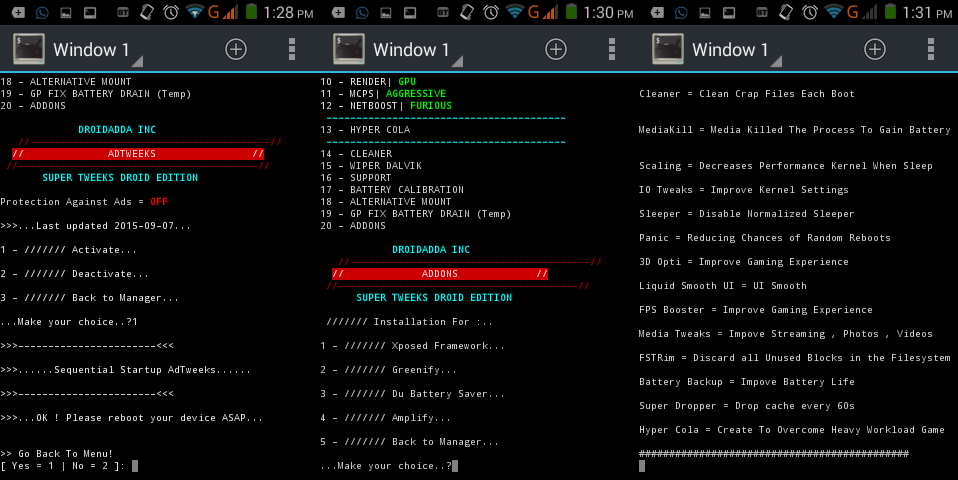
          Once the mod is installed it will take care of itself but if you want to manage the scripts, there is a manager which will let you modify the script functions.
          For this you need a terminal emulator to run the commands.
          Manager fully dedicated to the operation of Mod to make it fully functional manager to have performance Optimals( Xbooster , ADSuper , BackGround App...)

          • Open the terminal
          • Type su to get root privileges
          • Type menu and enter

          The Following Options will be available then :
          • SYSTEM INFO : Useful information about your system
          • CHECK : Check the installation of the mod
          • XBOOSTER : It clear the cache of your old system and thus gets more free RAM For you and increases performance
          • BACKGROUND APP : Function to block a demand application 
          • PROFILS : Performance profile available for VM Tweaks 
          • LMK : Performance profile available for Low Memory Killer 
          • SUPER: This function writes the kernel parameters of read_wake up_threshold read_wakeup_threshold and to improve the speed of ui . Changes the user profile entropy for the convenience 
          • MASTER : Super control with a huge collection of scripts ( Renice , Zram , Sd Tuner ,Scaling and many others ) 
          • ADSUPER : Service against the ads and malware domains 
          • RENDER : CPU OR GPU  
          • MCPS : Tweaks for Multicore only 
          • NETBOOST : Function ensures smoother navigation  
          • HYPER COLA : Script created by PizzaDox to best manage your games 
          • CLEANER : Clean your device unnecessary files to the system 
          • WIPER DALVIK : Clean your Dalvik cache engine 
          • SUPPORT : Help for the mod 
          • BATTERY CALIBRATION : Calibrating the battery for better autonomy 
          • ALTERNATIVE MOUNT : When mounting worries 
          • GP FIX BATTERY DRAIN : Fix the battery drain caused by the Google Play services
          • ADDONS : Gives the possibility to download to essential apps
          • BACKUP & RESTORE : Make a backup / restore your settings
          • SELINUX MODE : Kernel security system
          • WEBSITE : Direct link to the official page
          • FACEBOOK PAGE : Direct link to the official page FCB
          • DONATIONS : Buy me a cup of coffee if you enjoy my work. It'll motivate me to work harder and faster
          • UNINSTALL : Removal of the engine, will not leave any trace

          Included Scripts

          As i've build this tweek, i can say that Super Tweek is fully stable mod for Android Devices to optimize it.

          ►  S.T Profiles
          Several profiles are available depending on the value of your device
          Game = Created to perform well in the games
          Balance = Good compromise between games and multitasting
          Multitasting = Supports many applications open at the same time
          Force = By default, the most powerful of all
          ► LMK Tweeks
          Several LMK (Minfree) are available depending on the value of your device
          Light = Multitasting
          Moderate = Smoother
          Hard = Game
          ► Super
          It used to have significant lag reduction . It shows significant improvements on all devices.This function writes the kernel parameters of read_wake up_threshold read_wakeup_threshold and to improve the speed of ui.
          Entropy increases battery life and reduces lag.
          In each levels, these bits are increased
          The entropy actually different values of bits used to wake the sleeping process.
          Enlarger level is made in Zepp.
          Changes the user profile entropy for the convenience .
          Default = Original values of the android system
          Light = Similar to moderate but lower
          Moderate = Better than the default
          Agressive = Similar to moderate but higher
          Enlarger = Settings created by Zeppelinrox 
          ► Master
          Renice System = Priority of System Apps
          Flags Tuner = Improve Snappiness of The Overall System
          Flush Engine = AutoMod Drop cache each hour
          Governor Tuner = Sets Governors for Better Battery Backup
          HeapSize Boost = Optimized the Engine Dalvik
          Vaccum/Reindex = Optimize readings and deletions repetitive data
          Wifi Sleep = Wifi Switch in Case of Deep Sleep
          Zram = Compress the RAM it increases system responsiveness
          Zipalign = Optimization To APK
          Adreno Booster = Optimization of GPR
          SD Tuner = Improved Reading SD
          Touch = Improved Touch
          Cleaner = Clean Crap Files Each Boot
          MediaKill = Media Killed The Process To Gain Battery
          Scaling = Decreases Performance Kernel When Sleep
          Tweaks = Sets The Kernel For Good Performance
          Sleeper = Disable Normalized Sleeper
          Panic Mode = Reducing Chances of Random Reboots
          3D Optimize = Improve Gaming Experience
          FPS Booster = Improve Gaming Experience
          Media Tweaks = Improve Streaming , Photos , Videos
          Liquid Smooth = UI Smooth
          FSTRim = By default, FSTrim will discard all unused blocks in the filesystem
          Battery Backup = Best battery management
          Super Dropper = It's not an everyday option but occasionaly , For heavy games or heavy apps
          Fix GP Services = Fix the battery drain caused by the Google Play services
          Scroll Speed = Improve the scrolling of the device
          Logcat = Disabling system log for best performance
          Kill Playstore = Kill Playstore startup process for better autonomy
          KSM = Kernel same-page merging , KSM merge memory pages occupied by several processes
          TouchScreen Tweaks = This tweaks will give better touch response
          ► MPCS
          It manages the cores present in your system for better performance or autonomy
          Disabled : Potentially better battery life
          ON : Power save balance by loading first core it's 100% loaded
          Aggressive : Load balance the CPU cores by keeping the load even between them
          Kernel Default : Default kernel (stock or custom)
          ► NetBooster
          Internet optimization level
          Quick = Battery Friendly
          Fast = Normal
          Faster = Nearly Maxed Out
          Furious = Known Maxed Out
          SuperMax = Secret Maxed Out
          ► Tweeks Presets

          Here Presets of configuration to help news users. Each type will give significant improvements on each device but are not systematic, you have the option of coupled these types:

          # Preset Battery :
          • Profil Balance 
          • LMK Light
          • Super Agressive
          • AdSuper On
          • Render CPU
          • MPCS Disabled
          • NetBoost Quick
          • In Master = Flags Tuner / Wifi Sleep / Zipalign / Cleaner / Mediakill / Scaling / IO Tweaks / Sleeper / Liquid Smooth UI / Fstrim / Battery Backup / Fix GP Services
           # Preset Balance :
          • Profil Force
          • LMK Moderate
          • Super Default
          • AdSuper On
          • Render CPU
          • MPCS Agressive
          • NetBoost Furious
          • In Master = Renice System / Flags Tuner / Vaccum Reindex / Zram / Zipalign / Cleaner / Mediakill / Liquid Smooth / Fstrim / Fix GP Services / Scroll Speed
           # Preset Performance :
          • Profil Force
          • LMK Moderate
          • Super Enlarger
          • AdSuper On
          • Render GPU
          • MPCS Agressive
          • NetBoost Furious ( Or SuperMax but beware )
          • In Master = Renice System / Flags Tuner / Zram Swap / Zipalign / SD / Touch / Cleaner / Liquid Smooth UI / FSTrim / Fix GP Service / Scrool Speed
           # Preset Game : 
          • Profil Game
          • LMK Hard
          • Super Enlarger
          • AdSuper
          • Render GPU
          • MPCS Agressive
          • NetBoost Furious ( Or SuperMax but beware )
          • In Master = Flags Tuner / Governor Tuner / HeapSize Boost / Panic Mode / 3D Opti / Liquid Smooth / FPS Booster / Media Tweaks

          What To Do If Your Device Stuck in BootLoop?

          If bootloop or problem with a tweak. There is a tool to settle this problem without having to reformat the system.
          Init.d purge tweaks and clean Dalvik and resource. This Uninstaller doesn't purely uninstall the mod installed but inspite of doing thai it permanently disables the mod from your device so thet you can enjoy the stock experience again.
          Also Read: LSpeed Flashable Mod For Android To Optimize Your Device

          Credits

          Google ( My Best Friend )
          Sunmughan Swamy
          Droidadda
          XDA, GitHub
          Mediatek, Qualcomm Threads

          Final Words

          This was the article on Samsung S8 Edge Music Player. Now, without any issues, you can explore the features with your friends using this music player. I hope you like this article. If you face any issues feel free to comment below. 
          Thank you for visiting Droidadda and keep visiting for more tips and tricks and Android articles. Share this article among your friends to aware most of your friends about this trick.