Articles by "Lenovo K3 Note"
Showing posts with label Lenovo K3 Note. Show all posts
Droidadda is one of worlds best online blogging portal where latest trending articles on Android,Blogging,Seo,Gadgets,Tricks,etc are daily published.

Install Android Nougat AOSP 7.1.1 on Lenovo K3 Note

Now you can update Lenovo K3 Note with the latest Android Nougat via AOSP 7.1 Custom ROM. Yes the Nougat AOSP 7.1 custom ROM is now officially available for the Lenovo K3 Note users. The new update some with lots of new features and improvements. TO apply this latest Android nougat update on your phone, you need a phone with TWRP recovery. AOSP 7.1 Nougat ROM for Lenovo K3 Note is ported from Lenovo A7000 source and quite stable for daily use.
All credit goes to the developer Asish RP, who released the initial build of Android 7.1 AOSP Nougat ROM for Lenovo K3 Note. Here in this guide, you can Download, and Install AOSP 7.1 Nougat ROM for Lenovo K3 Note and Update Lenovo K3 Note to Android 7.1 Nougat. So let get started.

Things to remember before Install Android 7.1.1 on Lenovo K3 Note

  • This guide is only for the K3 Note users, don’t apply this method on any other phones.
  • Do tkae the full backup of your phone.
  • Ensure that your phone has at least 50-60% charged.
  • Read all steps very carefully and follow all of them one by one on your K3 Note.

Changelogs

  • Based on the latest version of MAD 
  • Fixed translation in menu reboot
  • Updated apps: contacts. 
  • Added T9 and the caller name in 2 lines
  • Launcher replaced by Pixel(bottom bar customizable in the manual)
  • Sewn Root and gapps(nano)
  • Sewn Sony Music
  • The new version of the kernel
  • Fixed radio
  • Fixed YouTube
  • Fixed tethering
  • Cut not working item SmartWake settings MAD

Download AOSP 7.1.1 V2 Nougat ROM for Lenovo K3 Note

  • AOSP 7.1 for Lenovo K3 Note – Download, Needrom
  • Lenovo K3 Note Modem – Download (Flash only if sim card not detect)
  • AOSP 7.1 Gapps for Lenovo K3 Note – Download

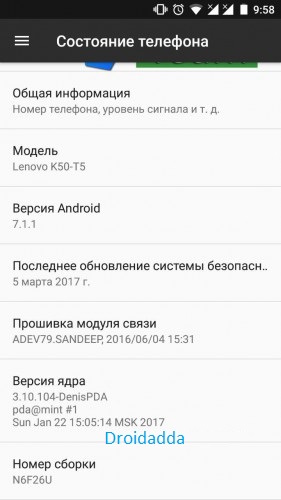
Screenshots


Install Android Nougat AOSP 7.1.1 on Lenovo K3 Note

  1. Download the Android 7.1 ROM and Gapps zip files from the above mention link and save it on your device.
  2. Boot your K3 Note into Recovery mode by press and hold “Volume Down+Power Button”
  3. Once you on the TWRP recovery mode. Go to Wipe > Advanced Wipe > Select Wipe cache, Dalvik cache, System, and data and swipe to confirm it.
  4. Now go back to the main menu of the TWRP recovery mode. To install the Android Nougat on Lenovo K3 Note.
  5. Select Install and locate the ROM zip file & swipe to Install the ROM file.
  6. After that Flash, the Gapps Zip file on your phone.
  7. After flashing both the files, wipe cache & Dalvik cache again and Reboot your device.
  8. That’s it. Now your K3 Note is running on the latest Android Nougat ROM. Let us know if you have any questions via comments below.
Droidadda is one of worlds best online blogging portal where latest trending articles on Android,Blogging,Seo,Gadgets,Tricks,etc are daily published.

Install Android Nougat AOSP 7.1 on Lenovo K3 Note

Now you can update Lenovo K3 Note with the latest Android Nougat via AOSP 7.1 Custom ROM. Yes the Nougat AOSP 7.1 custom ROM is now officially available for the Lenovo K3 Note users. The new update some with lots of new features and improvements. TO apply this latest Android nougat update on your phone, you need a phone with TWRP recovery. AOSP 7.1 Nougat ROM for Lenovo K3 Note is ported from Lenovo A7000 source and quite stable for daily use.
All credit goes to the developer Asish RP, who released the initial build of Android 7.1 AOSP Nougat ROM for Lenovo K3 Note. Here in this guide, you can Download, and Install AOSP 7.1 Nougat ROM for Lenovo K3 Note and Update Lenovo K3 Note to Android 7.1 Nougat. So let get started.

Things to remember before Install Android 7 on K3 Note

  • This guide is only for the K3 Note users, don’t apply this method on any other phones.
  • Do tkae the full backup of your phone.
  • Ensure that your phone has at least 50-60% charged.
  • Read all steps very carefully and follow all of them one by one on your K3 Note.

Changelogs

  • Based on the latest version of MAD 
  • Fixed translation in menu reboot
  • Updated apps: contacts. 
  • Added T9 and the caller name in 2 lines
  • Launcher replaced by Pixel(bottom bar customizable in the manual)
  • Sewn Root and gapps(nano)
  • Sewn Sony Music
  • The new version of the kernel
  • Fixed radio
  • Fixed YouTube
  • Fixed tethering
  • Cut not working item SmartWake settings MAD

    Download AOSP 7.1 Nougat ROM for Lenovo K3 Note

    • AOSP 7.1 for Lenovo K3 Note – Download, Needrom
    • Lenovo K3 Note Modem – Download (Flash only if sim card not detect)
    • AOSP 7.1 Gapps for Lenovo K3 Note – Download

    Screenshots


      Install Android Nougat AOSP 7.1.1 on Lenovo K3 Note

      1. Download the Android 7.1 ROM and Gapps zip files from the above mention link and save it on your device.
      2. Boot your K3 Note into Recovery mode by press and hold “Volume Down+Power Button”
      3. Once you on the TWRP recovery mode. Go to Wipe > Advanced Wipe > Select Wipe cache, Dalvik cache, System, and data and swipe to confirm it.
      4. Now go back to the main menu of the TWRP recovery mode. To install the Android Nougat on Lenovo K3 Note.
      5. Select Install and locate the ROM zip file & swipe to Install the ROM file.
      6. After that Flash, the Gapps Zip file on your phone.
      7. After flashing both the files, wipe cache & Dalvik cache again and Reboot your device.
      8. That’s it. Now your K3 Note is running on the latest Android Nougat ROM. Let us know if you have any questions via comments below.
      Droidadda is one of worlds best online blogging portal where latest trending articles on Android,Blogging,Seo,Gadgets,Tricks,etc are daily published.


      Stable EUI 5.5 For Lenovo K3 Note


      LeEco Stock Rom experience is now available for Lenovo K3 Note. Lenovo has been doing well in adopting the Indian consumers with its competitively priced products. To make its fans more excited, the company has started rolling out an unofficial update for Lenovo K3 Note users users, which carries the build number eUI 5.5.014S. This Rom is unofficially entering into the content streaming services For Lenovo K3 Note in India with this move. The update includes all LeTv Rom Features. Find more details below.

      The unofficial update weighs around 854 MB. As we mentioned above, the LeLIVE is the brand new feature with this update, which enables the users to start streaming the live tv instantly. The company has partnered with Yupp TV to provide over 100 premium channels, which includes most of your sports, movies, music, news and other channels. To name a few, you will get channels like CNBC Bazar, Sony Entertainment, Tupur Tupur, Saam TV, Just 24×7. The LeLIVE comes with the ability to watch up to 9 channels simultaneously. It is kind of a cool trick, which will come handy when you do not want to miss your favorite sport while watching the news. In a typical LeEco fashion, they have added a LIVE button to the sticky bottom app tray as you can see in screenshots.

      Talking about the LeVidi, the new video streaming app gives you the access to the relatively large amount of movie database. Currently, it has 2000 movies ranging from all time blockbusters to newest movies. Users should see the Levidi app in their app drawer once they have updated to latest version. The LeLIVE and LeVidi, both needs LeEco membership to access the premium content, which is also a new feature with this update.

      Image result for eui 5.5 for lenovo k3 noteImage result for eui 5.5 for lenovo k3 noteImage result for eui 5.5 english


      Update Details:


      • eUI version: 5.5.014S (Stable)
      • Android version: 5.0.2 (Lollipop)
      • Release time:N/A
      • Package size: 854MB.

      Update Changelog:


      • [Camera]
      • Fixed an issue in which camera forced to close under certain condition.
      • Updated camera temperature is warning from 50 degrees to 45 degrees.

      • [LeLive]
      • Added LeLive Function

      • [Calendar]
      • Fixed an issue in which content are too long to display completely when system language is English.

      • [My LeEco]
      • Added LeEco membership

      • [Map]
      • Fixed an issue in which show incorrect default location for India.

      • [System]
      • Power optimization
      • Fixed typos for certain modules

       DOWNLOADS:


      Le 1S eUI 5.5.014S OTA update


      Jumping to the usual system fixes, the power consumption has been optimized to lend longer screen on times while consuming media. The enhanced keypad precision should provide better typing experience with relatively zero mistakes. The changelog also reads that the Camera force close issue has been fixed alongside the irritating temperature warning pop-up. Users should see optimized slow motion recording. The company also ironed out the browser force close issue. Users might not see a drastic difference in real time, but this unofficial update is meant to fix pretty critical bugs. 

      Video:


      Droidadda is one of worlds best online blogging portal where latest trending articles on Android,Blogging,Seo,Gadgets,Tricks,etc are daily published.


      RESURRECTION REMIX 7.1.1

      Lenovo K3 Note can now be updated to the latest Android 7.1.1 Nougat, all thanks to ResurrectionRemix custom firmware. This is a fully working Android 7.1.1 Nougat custom firmware for Lenovo K3 Note. Besides the official Android 7.1.1 Nougat features, this custom firmware provides some aftermarket features to play with and modify your device to make it truly users. And with that, you will be able to update Lenovo K3 Note to Android 7.1.1 RESURRECTION REMIX Nougat using this complete tutorial. Not necessary, but it would be better if your phone is rooted and has a custom recovery installed. A custom recovery will be needed to install Android 7.1.1 based RESURRECTION REMIX ROM zip and Google Apps zip files, since this is not an official Lenovo firmware update. Make sure your HTC One bootloader is unlocked or you won’t be able to install custom ROMs. If interested in Android 7.1.1 for other phones, check out our new Custom ROMs section.
      If this is your very first time installing a custom ROM, we understand you would want to make sure your installation process go as smooth as possible. So before we actually jump to the installation process of RESURRECTION REMIX ROM, let’s take a look below at how to backup all your data. When installing this Android 7.1.1 Nougat based custom ROM, your entire data will be wiped clean — like a brand new phone. As a Lenovo K3 Note User, you have several options to choose from depending on how you want to store your data. These are the some of the tips given below that we want you to keep in mind and then proceed.

      This amazing RESURRECTION REMIX custom ROM comes with tons of new features and is based on Android 7.1.1 Nougat. A quick list of the main features in RESURRECTION REMIX is given below and we are sure you’d love to use this on your Lenovo K3 Note:
      Disclaimer: All the custom ROMs and firmwares, official software updates, tools, mods or anything mentioned in the tutorial belong to their respective owners/developers. We (TeamAndroid.com) or the developers are not to be held responsible if you damage or brick your device. We don’t have you on gun point to try out this tutorial

      CHANGELOGS:

      Ril
      Camera
      4g on both slot
      FM radio
      Mic
      Speaker
      HD voice Recording
      Screen Recorder
      Lenovo Gallery added
      Chrome added
      Omni switcher
      Substratum Theme Added
      Sony music added
      Footej camera added..

      WHATS NEW?

      YouTube Zoom bug Fixed(Thx to sandeep sethi)
      Proxy sensor bug fixed...
      Hotspot bug fixed...
      GPS Bug Fixed..
      ULTIMATE Battery backup Added...
      Pixel UI Theme Added..


      FEATURES:

      RR Customizations:-
      -Enable/Disable Navbar
      -Navbar Button Customization smartbar
      -Navbar Pulse
      -Navbar Fling
      -Double Tap To sleep navbar
       -Statusbar
      -Brightness Slider
      -Enable/Disable Show Notification Count
      -SuperUser Indicator Switch
      -Double Tap To sleep Statusbar
      -Carrier Label
      -Carrier Label Switch
      -Carrier label Color
      -Carrier Label Size
      -Clock Customizations
      -Time & date
      -Day & date Toogle
      -Center/Right/Left Clock Choice
      -Date Format
      -Clock Font Styles
      -Battery
      -Battery Bar customization
      -Battery Icon Customization(circle/landscape/Potrait and more)
      -Battery % Text
      -Network Traffic Indicator
      -Network Traffic Arrows Switch
      -Incoming/OutGoing Traffic
      -Network traffic Color
      -Statusbar RR Logo
      -RR logo Color
      -Position
      -Custom Logos
      -logo Color
      -Position
      -Style
      -StatusBar Weather
      -Weather Color
      -Weather Position(left/right)
      -Weather Font Style
      -Weather Size
      -StatusBar Ticker
      -Ticker Text color
      -Ticker Icon Color


      -Animations
      -Toast Animations
      -ListView Animations
      -System Animations
      -Power Menu Animations
      -Misc Animations


      -Gestures
      -Gestures Anywhere Feature
      -3 Finger Swipe Screenshot Gesture


      -App Circle Bar 
      -Choose apps in AppSidebar
      -Trigger Width
      -Trigger Hieght
      -Trigger Position
       

      -App Sidebar
      -Choose apps in App circle
      -Trigger Width
      -Trigger Hieght
      -Trigger Position
      -Pie
      -Pie Trigger(left ,Right ,Bottom)
      -Pie Targets
      -Pie Colors
      -More Pie Features


      -Recents Panel
      -Clear All button Switch
      -Clear All Tasks Switch
      -Clear All Button Location(Top right,Top Left,Top Center,Bottom Left,Bottom Right,Bottom Center)
      -Full Screen Recents
       

      -Recents Styles
      -OmniSwitch


      -Cclock Widget
      -CLock And Alarm Customizations
      -Weather Panel Customizations
      -Calender Events


      -LockScreen
      -Lockscreen Bottom Shortcuts
      -Lockscreen General Shorcuts
      -100+ Icons for Shortcuts
      -Double Tap to Sleep Lockscreen
      -Lockscreen Media Art/Enable Disable
      -Quick PIN/Patter Unlock
      -LockScreen Wallpaper
      -Lockscreen Weather Widget
      -Lockscreen Icons Color


      -Quick Settings Draggable Tiles
      -Customizable Tiles
      -Dyanamic Tiles Adjustment
      -Number of columns/rows
      -Tile Animations
      -Notification Drawer
      -LongPress Toogles to Enter Settings
      -Disable Immersive Mode Messages
      -Force Expand Notification
      -Quick PullDown
      -Smart Pulldown
      -Notification Panel Transperency
      -Volume Dialog Transperency
      -Notification Panel Stroke
      -Volume Dialog Stroke


      -Buttons
      -Backlight Timer
      -Backlight Strength


      -Advanced Reboot Menu
      -Power Menu Customizations
      -Power Off
      -Reboot(Recovery, Bootloader, Hot Reboot)
      -ScreenShot
      -Power Menu End Calls Switch
      -Restart SystemUI
      -Airplane Mode
      -ScreenRecord
      -On the Go Mode
      -Sound Panel


      -Home Button (For devices with HW keys Only)
      -Home Button answer call
      -Long Press Actions
      -Double Tap Actions


      -Menu Button (For devices with HW keys Only)
      -Short Press Actions
      -Long Press Actions


      -Search Button (If Device Supports)
      -Short Press Action
      -Long Press Action


      -Volume Buttons
      -Wake Up Device
      -Playback Control
      -Ringtone Volume Control
      -Keyboard Cursor Control
      -Swap Buttons on Landscape mode
      -Volume Key Answer


      -Miscellaneous
      -Selinux Switch (Switch Between Permissive and Enforcing Selinux if Device has Selinux Enabled)
      -cLock Shortcut
      -Disable Battery Saver Warning Color
      -OTA U
      -Cammera Shutter Sound Enable/Disable


      -SystemUI Tuner
      -Enabled By default
      -Removed Demo mode and Tweaked SystemUI Tuner As compared To AOSP
      -StatusBar Icons Cuzomizations
      -Quick Settings Customizations


      -Other Features
      -Perfomance Profiles
      -LCD Density
      -Expanded Desktop Mode
      -Heads Up Switch and customizations
      -Live Display
      -Configurable 0,90,180,270 Degree Rotation
      -Lock Screen Autorotate Switch
      -Native Tap to Wake From Marshmallow
      -Double Tap Power Button To enable Camera gesture
      -Prevent Accidental Wakeup
      -Wake Phone on Charging Plug
      -Battery Light Customizations
      -Notification Light Customizations
      -Font Size
      -CM privacy guard
      -Performance Tweaks(Kernel Aduitor Inbuilt)


      -CM root inbuilt

      -RR OTA
      -A Whole new RR Configurations
      -OverAll Smoothness Improvements
      -Optimizations to Improve Battery
      -Includes All Android Nougat Features
      -Includes ALL CM14.1 Features


      BUGS:
      1.Video recording ( use footej camera)
      2.Youtube zoom bug(when zoom bug appers, end video and restart video)


      installation Step: 


      1. recommended Twrp3.0 + recovery for flash


      2. restart to recovery mode – wipe dalvik cache, data, cache, system


      3. Install ROM and hotspot fix(all link below)


      4. reboot

      Credits:

      Adeveloper79 

      Ankit Kumar Mandal

      Resurrection Remix Team

      Lineage OS 

      firmware author mugik04 http://4pda.ru/forum/index.php?showuser=2315091


      Download Section:


      Direct Link

      Mirror


      SCREENSHOTS:


      Droidadda is one of worlds best online blogging portal where latest trending articles on Android,Blogging,Seo,Gadgets,Tricks,etc are daily published.

      AICP Android Ice Cold Project [WIP]

      AICP is known by everyone as Android Ice Cold Project that started on HTC Desire HD and since then evolved into a mature ROM with the BEST community you can find!!!
      Until lollipop, ROM has always been AOKP based. Unfortunately, since AOKP either stopped development or will make a comeback later this year, we changed our base to CyanogenMod when it comes to hardware, drivers and some features.


      Display and animations:
      System animations
      Toast icon and animation
      Power menu animation
      IME animation
      LCD densidy changer
       
      Status bar:
      Clock style (position, date view, date format, color, font type and size, seconds)
      Status bar icons control
      Battery Icon style (percentage, icon type)
      Brightness control
      Show notification count
      Quick pulldown on QS
      Superuser indicator control
      Headset icon
      AICP logo
      Traffic Indicators
      Carrier Label
      Battery bar
      Statusbar weather temperature
       
      Notification drawer:
      Brightness slider
      Time contextual header
      Weather info settings
      CAF Task Manager
      Force expanded notifications
      Disable immersive mode messages
       
      Recents panel:
      Clear all button settings
      Show/hide search bar in recent menu
      Recents in fullscreen
      Show/hide clock and date in recent menu
      Memory bar
       
      Lock screen:
      Show/hide music visualizer
      Show/hide media cover art
      Lock screen shortcuts
      Mid-Screen shortcuts
      Lock screen blur
      DT2S on lockscreen
      Lock Clock fonts
      Lockscreen weather options
       
      Buttons:
      Enable/disable navigation bar buttons
      Left-handed mode
      Buttons and layout settings
      Adjust navigation bar dimensions
      CM button long press, double press features
      SlimDim
      Power menu settings
      Press power button twice for camera
       
      Misc:
      Pie Control
      Gesture Anywhere
      App Circle Bar
      Slim Recents
      OmniSwitch
      Scrolling cache settings
      Disable FC notifications
      DT2S on navigation bar
      Launch music app when headset is connected
      Enable/disable screenshot sound
      Three fingers swipe for screenshot
      System App remover
      Take logcat, kmesg, dmesg on the go! (AicpExtras -> Log that 's'hit)
      AICPStats

      Quick Settings toggles:
      QS Compass Tile
      QS NFC Tile
      QS Sync Tile
      QS Volume Tile
      QS Profiles Tile
      QS USB tether Tile
      QS Screen timeout Tile
      QS Performance Tile
      QS Lockscreen toggle Tile
      QS Ambient Display Tile
      QS Live Display Tile
      QS Brightness Tile
      QS ScreenOff Tile
      QS Screenshot Tile
      QS Expanded desktop Tile
      QS Music Tile
      QS Reboot Tile
      QS LTE Tile
      QS Nav bar Tile
      QS SlimPie Tile
      QS App circle bar Tile
      QS App side bar Tile


      In the beginning I would like to thank:
      CM team (Lineage)
      maxwen
      SlimBean rom team
      CarbonRom team
      LiquidSmooth rom team
      Omni rom team
      DU team
      Community


        +Sandeep Sethi pay for servers to build and everything that comes with it, so EVERY DONATION will really be appreciated and be used to cover those expenses.
      Thank you!

      https://www.paypal.com/cgi-bin/webscr?cmd=_donations&business=adeveloper79@gmail.com&item_name=Donation+from+a+guest+on+XDA+Developers+%28https%3A%2F%2Fforum.xda-developers.com%2Fk3-note%2Forig-development%2Fandroid-ice-cold-project-12-1-7-1-1-t3541637%29&no_shipping=1&lc=US


      AICP 12.1 ROM

      DOWNLOAD

        SUPERSU INSTALLER
         
        DOWNLOAD
         
        GAPPS 

        DOWNLOAD


        CODE:

        *26th Jan  DO FLASH SUPERSU AFTER FLASHING ROM
        *24th Jan  DO FLASH SUPERSU AFTER FLASHING ROM
        *20th JaN  DO FLASH SUPERSU AFTER FLASHING ROM 
         
        Camera Focus????? (USE DIFFERENT APP)
        Video Capture
        Auto Brightness (Fixed 20th Jan)
        Hotspot (Fixed 20th Jan)
        GPS


        ROMs should contain everything you need to enjoy Nougat. You are not required to install any Add Ons, simply download the latest ROM, Google Apps, flash it, and go!
        You are STRONGLY recommended to fully wipe your device before flashing, and if possible avoid restoring system apps and system data with Titanium Backup - these can cause stability issues that are very hard to debug. If you believe you know what you're doing - then fine, go ahead, but please don't complain if you experience strange behavior.


        How to flash:

        Make sure you have TWRP recovery on your device.
        Make a backup of your current ROM.
        Wipe system, data, cache and dalvik.
        Flash ROM.zip and Googleapps.zip.
        Reboot system and setup!


        Sources: https://github.com/adeveloper79


        ROM:
        Github link: https://github.com/AICP
        Gerrit link: http://gerrit.aicp-rom.com
        XDA:DevDB Information
        [ROM][7.1.1][19Jan2017]
        [AICP]Android Ice Cold Project 12.1
        ROM for the Lenovo K3 Note
        Contributors
        sandeep.sethi
        Source Code: https://github.com/AICP
        ROM OS Version: 7.x Nougat
        ROM Kernel: Linux 3.10.x
        ROM Firmware Required: TWRP
        Version Information
        Status: Alpha
        Created 2017-01-20
        Last Updated 2017-01-26
        Droidadda is one of worlds best online blogging portal where latest trending articles on Android,Blogging,Seo,Gadgets,Tricks,etc are daily published.


        RESURRECTION REMIX 7.1.1

        Lenovo K3 Note can now be updated to the latest Android 7.1.1 Nougat, all thanks to ResurrectionRemix custom firmware. This is a fully working Android 7.1.1 Nougat custom firmware for Lenovo K3 Note. Besides the official Android 7.1.1 Nougat features, this custom firmware provides some aftermarket features to play with and modify your device to make it truly users. And with that, you will be able to update Lenovo K3 Note to Android 7.1.1 RESURRECTION REMIX Nougat using this complete tutorial. Not necessary, but it would be better if your phone is rooted and has a custom recovery installed. A custom recovery will be needed to install Android 7.1.1 based RESURRECTION REMIX ROM zip and Google Apps zip files, since this is not an official Lenovo firmware update. Make sure your HTC One bootloader is unlocked or you won’t be able to install custom ROMs. If interested in Android 7.1.1 for other phones, check out our new Custom ROMs section.
        If this is your very first time installing a custom ROM, we understand you would want to make sure your installation process go as smooth as possible. So before we actually jump to the installation process of RESURRECTION REMIX ROM, let’s take a look below at how to backup all your data. When installing this Android 7.1.1 Nougat based custom ROM, your entire data will be wiped clean — like a brand new phone. As a Lenovo K3 Note User, you have several options to choose from depending on how you want to store your data. These are the some of the tips given below that we want you to keep in mind and then proceed.

        This amazing RESURRECTION REMIX custom ROM comes with tons of new features and is based on Android 7.1.1 Nougat. A quick list of the main features in RESURRECTION REMIX is given below and we are sure you’d love to use this on your Lenovo K3 Note:
        Disclaimer: All the custom ROMs and firmwares, official software updates, tools, mods or anything mentioned in the tutorial belong to their respective owners/developers. We (TeamAndroid.com) or the developers are not to be held responsible if you damage or brick your device. We don’t have you on gun point to try out this tutorial


        FEATURES:

        RR Customizations:-
        -Enable/Disable Navbar
        -Navbar Button Customization smartbar
        -Navbar Pulse
        -Navbar Fling
        -Double Tap To sleep navbar
         -Statusbar
        -Brightness Slider
        -Enable/Disable Show Notification Count
        -SuperUser Indicator Switch
        -Double Tap To sleep Statusbar
        -Carrier Label
        -Carrier Label Switch
        -Carrier label Color
        -Carrier Label Size
        -Clock Customizations
        -Time & date
        -Day & date Toogle
        -Center/Right/Left Clock Choice
        -Date Format
        -Clock Font Styles
        -Battery
        -Battery Bar customization
        -Battery Icon Customization(circle/landscape/Potrait and more)
        -Battery % Text
        -Network Traffic Indicator
        -Network Traffic Arrows Switch
        -Incoming/OutGoing Traffic
        -Network traffic Color
        -Statusbar RR Logo
        -RR logo Color
        -Position
        -Custom Logos
        -logo Color
        -Position
        -Style
        -StatusBar Weather
        -Weather Color
        -Weather Position(left/right)
        -Weather Font Style
        -Weather Size
        -StatusBar Ticker
        -Ticker Text color
        -Ticker Icon Color


        -Animations
        -Toast Animations
        -ListView Animations
        -System Animations
        -Power Menu Animations
        -Misc Animations


        -Gestures
        -Gestures Anywhere Feature
        -3 Finger Swipe Screenshot Gesture


        -App Circle Bar 
        -Choose apps in AppSidebar
        -Trigger Width
        -Trigger Hieght
        -Trigger Position
         

        -App Sidebar
        -Choose apps in App circle
        -Trigger Width
        -Trigger Hieght
        -Trigger Position
        -Pie
        -Pie Trigger(left ,Right ,Bottom)
        -Pie Targets
        -Pie Colors
        -More Pie Features


        -Recents Panel
        -Clear All button Switch
        -Clear All Tasks Switch
        -Clear All Button Location(Top right,Top Left,Top Center,Bottom Left,Bottom Right,Bottom Center)
        -Full Screen Recents
         

        -Recents Styles
        -OmniSwitch


        -Cclock Widget
        -CLock And Alarm Customizations
        -Weather Panel Customizations
        -Calender Events


        -LockScreen
        -Lockscreen Bottom Shortcuts
        -Lockscreen General Shorcuts
        -100+ Icons for Shortcuts
        -Double Tap to Sleep Lockscreen
        -Lockscreen Media Art/Enable Disable
        -Quick PIN/Patter Unlock
        -LockScreen Wallpaper
        -Lockscreen Weather Widget
        -Lockscreen Icons Color


        -Quick Settings Draggable Tiles
        -Customizable Tiles
        -Dyanamic Tiles Adjustment
        -Number of columns/rows
        -Tile Animations
        -Notification Drawer
        -LongPress Toogles to Enter Settings
        -Disable Immersive Mode Messages
        -Force Expand Notification
        -Quick PullDown
        -Smart Pulldown
        -Notification Panel Transperency
        -Volume Dialog Transperency
        -Notification Panel Stroke
        -Volume Dialog Stroke


        -Buttons
        -Backlight Timer
        -Backlight Strength


        -Advanced Reboot Menu
        -Power Menu Customizations
        -Power Off
        -Reboot(Recovery, Bootloader, Hot Reboot)
        -ScreenShot
        -Power Menu End Calls Switch
        -Restart SystemUI
        -Airplane Mode
        -ScreenRecord
        -On the Go Mode
        -Sound Panel


        -Home Button (For devices with HW keys Only)
        -Home Button answer call
        -Long Press Actions
        -Double Tap Actions


        -Menu Button (For devices with HW keys Only)
        -Short Press Actions
        -Long Press Actions


        -Search Button (If Device Supports)
        -Short Press Action
        -Long Press Action


        -Volume Buttons
        -Wake Up Device
        -Playback Control
        -Ringtone Volume Control
        -Keyboard Cursor Control
        -Swap Buttons on Landscape mode
        -Volume Key Answer


        -Miscellaneous
        -Selinux Switch (Switch Between Permissive and Enforcing Selinux if Device has Selinux Enabled)
        -cLock Shortcut
        -Disable Battery Saver Warning Color
        -OTA U
        -Cammera Shutter Sound Enable/Disable


        -SystemUI Tuner
        -Enabled By default
        -Removed Demo mode and Tweaked SystemUI Tuner As compared To AOSP
        -StatusBar Icons Cuzomizations
        -Quick Settings Customizations


        -Other Features
        -Perfomance Profiles
        -LCD Density
        -Expanded Desktop Mode
        -Heads Up Switch and customizations
        -Live Display
        -Configurable 0,90,180,270 Degree Rotation
        -Lock Screen Autorotate Switch
        -Native Tap to Wake From Marshmallow
        -Double Tap Power Button To enable Camera gesture
        -Prevent Accidental Wakeup
        -Wake Phone on Charging Plug
        -Battery Light Customizations
        -Notification Light Customizations
        -Font Size
        -CM privacy guard
        -Performance Tweaks(Kernel Aduitor Inbuilt)


        -CM root inbuilt

        -RR OTA
        -A Whole new RR Configurations
        -OverAll Smoothness Improvements
        -Optimizations to Improve Battery
        -Includes All Android Nougat Features
        -Includes ALL CM14.1 Features


        BUGS:
        1.Video recording ( use footej camera)
        2.Youtube zoom bug(when zoom bug appers, end video and restart video)


        installation Step: 


        1. recommended Twrp3.0 + recovery for flash


        2. restart to recovery mode – wipe dalvik cache, data, cache, system


        3. Install ROM and hotspot fix(all link below)


        4. reboot

        Credits: To the owner of ROM- Adeveloper79

        firmware author mugik04 http://4pda.ru/forum/index.php?showuser=2315091


        Download Section:


        Direct Link

          Mirror


          SCREENSHOTS: