Articles by "Flyme OS"
Showing posts with label Flyme OS. Show all posts
Droidadda is one of worlds best online blogging portal where latest trending articles on Android,Blogging,Seo,Gadgets,Tricks,etc are daily published.

A few Month ago Meizu released global beta version of their newest mobile system. Flyme OS 6 were sent to the closed group of beta testers and i have pleasure that one of our respecte dev Tirth Patel had built this rom for Mediatek MT6592 devices.. I’ve been using this for more then a week and decided to share my reviews and opinions with you all.

About this version

The system design is more distinct, fascinating, and focused on content. Flyme 6 provides a fun browsing experience with delicate and agile animation. The new Intelligent Thinking Engine "One Mind" will automatically pick up user habits and provide solutions based on different scenarios, aiming to create a smart mobile phone with light and smooth user experience. A more powerful safe mode — Parallel Space — allows users to switch freely between multiple identities and spaces.

Changelogs

  • Added Google Installer Flyme 6 For Gapps
  • Added Smart Wake , with app Integration in settings
  • Added SuperSU
  • Added Kernel Auditor
  • Added Sony Keyboard
  • Added OTGMounter
  • Added Xposed (now u can install packages from application)
  • Added OMX MTK Video Decoder
  • Added Root Explorer
  • Added MX Player
  • Added Reboot Mode app
  • Added Sony Music Player
  • Fixed Camera & Gallery [with stock LineageOS application Source]
  • Fixed Youtube
  • Fixed Green Lines In Facebook
  • Fixed VPN
  • Disabled Checking Signature Applications System Completely
  • Activated ClearMotion, BRAVIA v4 and X-Reality Engine v4,
  • Spelled trouble-free codecs to view FullHD streaming video
  • Improved battery power at the expense of the binaries and libraries
  • Patched Power Profile

Screenshots Slideshow

Downloads

MT6592 Devices : List of few MT6592 devices with Flyme OS 6 is given below. Find out you devices and download it. If your device is not listed in the list then you can port it for your devices or you can contact your device developers if available else you can also contact me.
Note: This version of Flyme 6 build is not favourable for Dual Sim users who are willing to use Data Connection on both sim's. If you use dual sim in this rom the the data connection option will get disabled. This is a source but and i hope it will be fixed soon.
I personally advised you all to use single sim for data connection on this rom. 

Credits

  • Flyme Open Source Project
  • Fire855 (MT6592 Maintainer)
  • Ferhung (MT6582 Maintainer)
  • Tirth Patel (Built the Rom from Source for Mt6592)
  • Tribetmen (2G/3G Switch and Data connection after reboot Fixed)
  • Ahmed Nasser HK (Fixed critical Bugs)

Final Words

So this was the article on Stable Flyme OS 6 for Mediatek 32bit Devices. I hope you love this article. Share this article with your friends and do let them know about this amazing Android Custom Rom and I hope they will love it and love to install it on their Blogs.
Thank you for visiting Droidadda and keep visiting for more tips and tricks like this and I will meet you in the next article. Till then stay peace.
Droidadda is one of worlds best online blogging portal where latest trending articles on Android,Blogging,Seo,Gadgets,Tricks,etc are daily published.

Stable Flyme OS 5.12.1.25R For Micromax A104

Flyme OS is a firmware developed by Meizu for smartphones based on the Android operating system. The key features are its simple UI, one-handed usability and performance optimisations. The latest version of this OS is the Flyme 5. This version was Modded and Refreshed by Ahmed N. Houssein. And was Ported and finalised by Gautam Sahu for Micromax Fire 2 on my behalf.
Mediatek MT6582 users can download the Flyme 5.1.5G for their devices now. Indian customers can download Flyme 5.1.5IN fortheir MT6582 devices.

    meizu-mx5-m2note-box

    Flyme OS is very minimalistic. While many people love jazzy colours and UI transitions, I still love clean and simple UI on my phone. Thats probably, one of the reasons why I love Meizu’s phones for its flat looking icons, simplistic approach to Android and few tweaks which makes it faster than other phones.

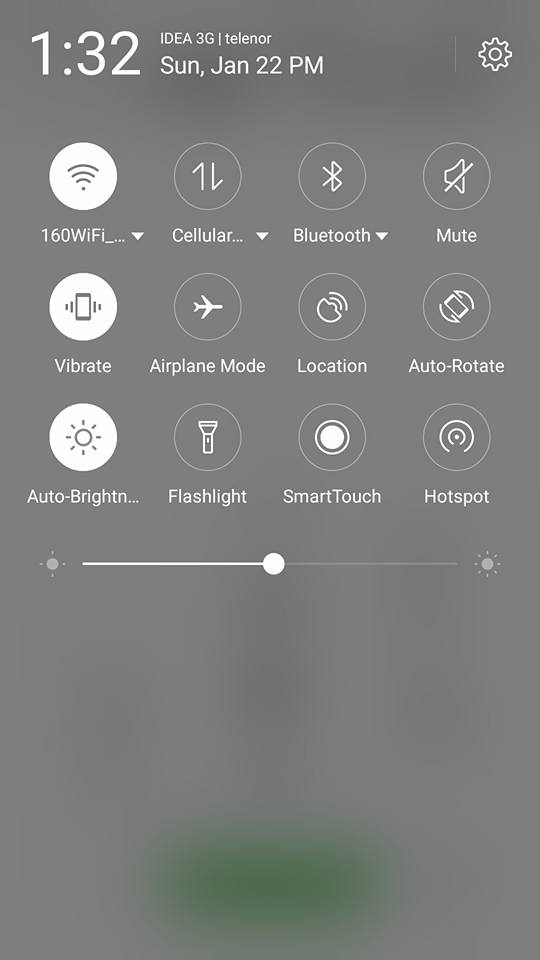
    Not only, the UI is simple, the gestures and toggles throughout the device are impressive. It does take a little bit of learning to understand Flyme, the moment you do its super simple and fast. Especially, when you want to use the phone one-handed. With smooth animations, large and easy icons to press the UI stands out the most on the Flyme OS. We have a number of interesting gestures on the Flyme OS. To name a few – While on the locked screen, you can Double tab to wake up, swipe up to goto the home screen straight away, while on the locked screen, you can swipe down from the top to bring on the notifications to control quick settings.

    gestures-meizu-flyme

    From the lock screen you can configure your favourite application when you swipe right, and swiping left starts the camera. You can also configure custom gesture settings; you can draw any letter to start an application. While on the home screen, you can swipe up to get a spotlight search option like on the iOS. Swiping up from the bottom left bezel near the single capacitive touch button brings on the multi-tasking switch and the most recent apps. You could quickly switch between them. Its pretty neat and very simple. Swiping up from an icon closes the program, and swiping up from the background will close all currently open applications.

    Flyme both looks good and works really well in a nice iOS/Android hybrid way. Similar to iOS, the stock FlymeOS launcher carries all installed applications on the home screens. Personally, I feel this to be lot cleaner than many other Android interfaces, which hide apps away in an app drawer. Today, many other companies are moving away from app-drawer approach. The keyboard is good too. The Flyme gives you a good range of application permissions and notification controls to play with. The fingerprint sensor doesn’t just work to unlock screen but also to open private folders and applications. You also have a vault, password protection feature where you can protect private folders and applications. The File explorer is pretty neat and gives you easy categories to look up.

    meizu-flyme-file-explorer

    Flyme also supports Multi-screen mode, where two applications can be displayed at the same time in multi-screen mode in an adjustable ratio (only few applications are supported at this moment). Icons can be selected and moved in batch mode to different pages by long pressing Home screen and selecting Icons to move them; further, you can also shake the phone to sort all the icons on the page.

    The startup speeds and App launches are pretty quick. While you uninstall an application on the phone, Flyme reminds if you want to clear the app cache simultaneously, thereby providing better and fast performance. The Scan and clear option can also be scheduled. The Immersive Mode where the color of status bar at the top will changes accordingly makes the whole interface more natural and very artistic.

    Changelogs 

    • Added Google Installer For GAPPS
    • Added Smart Wake , with app Integration in settings
    • Added Smart Cover , with app Integration in settings
    • Added Adaway , with app Integration in settings
    • Added SuperSU Integration in settings.
    • Added Kernel Auditor Integration in settings.
    • Added Sony Keyboard
    • Added MLUSBMounter
    • Added OmniSwitch
    • Added Font Chooser
    • Added System App Remover
    • Added Flash alerts settings
    • Added Edge Screen By Samsung
    • Added freeze apps Manager
    • Added Buildpropeditor
    • Added Xposed {Only App included in rom}
    • Added Font Sizer
    • Added Cache Auto cleaner
    • Added Screencast With Settings
    • Remove adaway,superSU, and some apps from app drawer, them, already in settings.
    • Fixed Youtube 720p
    • Fixed Green Lines In Facebook
    • Fixed VPN
    • Fixed Screen Record
    • Disabled Checking Signature Applications System Completely
    • Activated ClearMotion, BRAVIA v4 and X-Reality Engine v4,
    • spelled trouble-free codecs to view FullHD streaming video
    • braries

    Some Highlighted Features

    • Android 5.1.1 Sources
    • CyanogenMod 12.1 based Rom
    • Supports Gapps, SuperSU
    • Amazing New UI
    • Almost Bugless
    • DT2W Features
    • AppLock
    • Improved Battery
    • Music Player Redesigned
    • Performance Doze
    • Fully Tweeked with Scripts
    • Stable for Daily use
    • Camera Now more Stable
    • Storage Bug Fixed
    • Lots more to Discover

    Quote:
    FAQ & ADVICES
    1. Rom Take Long Time First Boot (5-7 minutes).
    2. After First Boot, Reboot your Device To see everything is okay.
    3. I Strongly Advise You, To Use Flyme Tools, Will Help You For Many Many Customization.
    4. If you have installing flyme tools open the app then go to framework look to (Pocket Mode) and disable it, because this have automatically enabled ( If enable sensor will always working and maybe get drain battery)

    Screenshots


    Downloads

    Download the Flyme OS 5.12.1.25R Rom for Micromax Fire 2 from the below link along with several patches and fixing files.


    Preparation Steps

    • Use this post only with the MT6582 devices.
    • Do not use this post for any other different Android devices.
    • For the ‘how-to’ guide to be completed successfully you will need to have a rooted device and a custom ROM has to be installed on it.
    • The installed custom Recovery has to be TWRP Recovery, CTR Recovery, CWM or Philz recovery. No other Custom Recovery works with this Flyme OS Android 5.1.x installation.
    • Make sure that the installed TWRP build is the latest one, so that it will support the new Android 5.1.x custom ROM installations.
    • In the ‘how-to’ part of this post you can find two extra preparation steps: the NANDROID Backup and the Factory Reset ones.
    • The NANDROID Backup creates a full restore point for your device, one that you can use in case the new custom ROM doesn’t work with your phone.
    • The Factory Reset process wipes clean the system partition, but it won’t delete any data files from the internal storage.
    • Factory Resetting the device means that the old custom ROM will be removed completely for the new Flyme Os Android 5.1.x Custom ROM to boot successfully.
    • In case you have to save any data from installed applications, then you should use the Helium app.
    • Use the tutorial only if you are an advanced user. We cannot be blamed in case you brick the phone nor in case you lose any data in the process.
    • Read the entire tutorial first and make sure that you won’t be skipping any steps.
    • Check the battery charge level of your device and make sure that it is over 50%, as it will prevent the phone from switching off during installation.
    • Now that you know all of the above you can continue to the next part of this post.

    How to Update Your MT6582 Device to Lineage OS ROM:

    1. Download the Flyme OS from link below
    2. Download Gapps for Android 5.1.x from here. link below.
    3. Transfer both zip files on your phone’s internal storage.
    4. After the files are copied you can disconnect the phone from PC.
    5. Do not unzip the files.
    6. Power off your phone.
    7. Now boot it in TWRP Recovery Mode.
    8. First thing that you have to do using the Recovery Options is to create the NANDROID Backup of the already installed ROM:
    9. Select the ‘backup’ options.
    10. Set a name for this file and confirm process.
    11. Start the ‘factory reset’ process:
    12. Select ‘wipe’ option and confirm.
    13. Now you can begin the Flyme OS installation:
    14. Select ‘install’ and find the Custom Rom zip file and load it.
    15. Confirm the flashing process and wait until the Custom Rom is done installing.
    16. Install the Gapps zip using the same steps above after the Rom is flashed.
    17. When all files are done installing you can reboot your smartphone in normal mode. 

    Device Info

            ROM InfoDetails
            DeviceFire 2
            Manufacturer     Micromax
            ChipsetMT6582
            SDK22
            Android5.1.1
            Kernel3.4.67+

    Credits

    • Flyme Team
    • Meizu
    • Ahmed N. Houssein
    • 4PDA
    • Gautam Sahu 
    • Sunmughan Swamy
    • Droidadda
    • You all for testing

    Final Words

    Note: The installation process of this new ROM is going to take a while. Also, the first boot process should take at least 10 minutes before it loads all the new files.

    Link For You:  For More Custom Roms Visit here. If you need any extra help completing this guide, then you should tell us in comments. If installation fails, then the only thing that you need to do is to try and repeat the whole tutorial more than once.
    Thankyou for visiting Droidadda. For fast access to our service Bookmark & Subscribe us now. Share this article with your friends & if you experience any issue then feel free to comment below. Peace out.
    Droidadda is one of worlds best online blogging portal where latest trending articles on Android,Blogging,Seo,Gadgets,Tricks,etc are daily published.


    Flyme OS 5.1.1 

    Flyme OS is a firmware developed by Meizu for smartphones based on the Android operating system. The key features are its simple UI, one-handed usability and performance optimisations. The latest version of this OS is the Flyme 5.
    Mediatek MT6582 users can download the Flyme 5.1.5G for their devices now. Indian customers can download Flyme 5.1.5IN fortheir MT6582 devices.

    meizu-mx5-m2note-box

    Flyme OS is very minimalistic. While many people love jazzy colours and UI transitions, I still love clean and simple UI on my phone. Thats probably, one of the reasons why I love Meizu’s phones for its flat looking icons, simplistic approach to Android and few tweaks which makes it faster than other phones.

    Not only, the UI is simple, the gestures and toggles throughout the device are impressive. It does take a little bit of learning to understand Flyme, the moment you do its super simple and fast. Especially, when you want to use the phone one-handed. With smooth animations, large and easy icons to press the UI stands out the most on the Flyme OS. We have a number of interesting gestures on the Flyme OS. To name a few – While on the locked screen, you can Double tab to wake up,  swipe up to goto the home screen straight away, while on the locked screen, you can swipe down from the top to bring on the notifications to control quick settings.

     gestures-meizu-flyme

    From the lock screen you can configure your favourite application when you swipe right, and swiping left starts the camera. You can also configure custom gesture settings; you can draw any letter to start an application. While on the home screen, you can swipe up to get a spotlight search option like on the iOS. Swiping up from the bottom left bezel near the single capacitive touch button brings on the multi-tasking switch and the most recent apps. You could quickly switch between them. Its pretty neat and very simple.  Swiping up from an icon closes the program, and swiping up from the background will close all currently open applications.

    Flyme both looks good and works really well in a nice iOS/Android hybrid way. Similar to iOS, the stock FlymeOS launcher carries all installed applications on the home screens. Personally, I feel this to be lot cleaner than many other Android interfaces, which hide apps away in an app drawer. Today, many other companies are moving away from app-drawer approach. The keyboard is good too. The Flyme gives you a good range of application permissions and notification controls to play with. The fingerprint sensor doesn’t just work to unlock screen but also to open private folders and applications. You also have a vault, password protection feature where you can protect private folders and applications. The File explorer is pretty neat and gives you easy categories to look up.

    meizu-flyme-file-explorer

    Flyme also supports Multi-screen mode, where two applications can be displayed at the same time in multi-screen mode in an adjustable ratio (only few applications are supported at this moment). Icons can be selected and moved in batch mode to different pages by long pressing Home screen and selecting Icons to move them; further, you can also shake the phone to sort all the icons on the page.

    The startup speeds and App launches are pretty quick. While you uninstall an application on the phone, Flyme reminds if you want to clear the app cache simultaneously, thereby providing better and fast performance. The Scan and clear option can also be scheduled. The Immersive Mode where the color of status bar at the top will changes accordingly makes the whole interface more natural and very artistic.

    CHANGELOG

    Added Google Installer For GAPPS
    Added Smart Wake , with app Integration in settings
    Added Smart Cover , with app Integration in settings
    Added Adaway , with app Integration in settings
    Added SuperSU Integration in settings.
    Added Kernel Auditor Integration in settings.
    Added Sony Keyboard
    Added MLUSBMounter
    Added OmniSwitch
    Added Font Chooser
    Added System App Remover
    Added Flash alerts settings
    Added Edge Screen By Samsung
    Added freeze apps Manager
    Added Buildpropeditor
    Added Xposed {Only App included in rom}
    Added Font Sizer
    Added Cache Auto cleaner
    Added Screencast With Settings
    *Remove adaway,superSU, and some apps from app drawer, them, already in settings.
    *Fixed Youtube 720p
    *Fixed Green Lines In Facebook
    *Fixed VPN
    *Fixed Screen Record
    *Disabled Checking Signature Applications System Completely
    *Activated ClearMotion, BRAVIA v4 and X-Reality Engine v4,
    spelled trouble-free codecs to view FullHD streaming video
    braries
    ================================================== =========

    Quote:
    : FAQ & ADVICES :
    1- Rom Take Long Time First Boot (5 -> 7 minutes).
    2- ?After First Boot, Reboot your Device To see everything is okay.
    3- I Strongly Advise You, To Use Flyme Tools, Will Help You For Many Many Customization.
    4- If you have installing flyme tools open the app then go to framework look to (Pocket Mode) and disable it, because this have automatically enabled ( If enable sensor will always working and maybe get drain battery)

    FlyMe OS :) Latest Build
    Android Version - 5.1.1

    Flash Gapps, SuperSU after flashing the zip
    Very nice UI,,,
    Almost Bugless
    Lots of features including dt2w, applock
    Can be used as daily driver....

    Has some unwanted apps which can be removed through system app remover

    ==================================================
    ==================================================


    SCREENSHOTS


    CREDITS: 

    MEIZU  
    OpenRom
    AMD
    XDA