Articles by "SEO"
Showing posts with label SEO. Show all posts
Droidadda is one of worlds best online blogging portal where latest trending articles on Android,Blogging,Seo,Gadgets,Tricks,etc are daily published.


When it comes to SEO, we know that link building is an ongoing process, but more often than not, we tend to neglect the on-page SEO aspects.
Site updates, theme updates/changes, plugin updates, adding a new plugin/functionality, and other changes like updating a file using FTP can cause some accidental errors that could lead to on-page SEO issues. Unless you proactively look for these errors, they will go unnoticed and will negatively influence your organic rankings.
For instance, I recently realized that I had been blocking out images in one of my blogs for almost 6 months because of an old and neglected Robots.txt file. Imagine the impact such a mistake could have on your rankings!

On-Page SEO Checkup

Keeping the importance of SEO in mind, here are 7 important checks that you need to conduct on a periodic basis to ensure that your on-page SEO is on point.
Note: Even though these checks are for people running a WordPress blog, they can be used for any blogger on any platform.

1. Check your site for broken links.
Pages with broken links (be it an internal or external link) can potentially lose rankings in search results. Even if you do have control over internal links, you do not have control over external links.

There is a huge possibility that a webpage or resource that you linked to no longer exists or has been moved to a different URL, resulting in a broken link.
This is why it is recommended to check for broken links periodically.
There is a whole host of ways to check for broken links, but one of the easiest and most efficient ways is with the ScreamingFrog SEO Software.
To find broken links on your site using ScreamingFrog, enter your domain URL in the space provided and click the “Start” button. Once the crawling is complete, select the Response Codes tab and filter your results based on “Client Error (4xx)”. You should now be able to see all links that are broken.
Click on each broken link and then select the Inlinks tab to see which page(s) actually contain this broken link. (Refer to image below.)
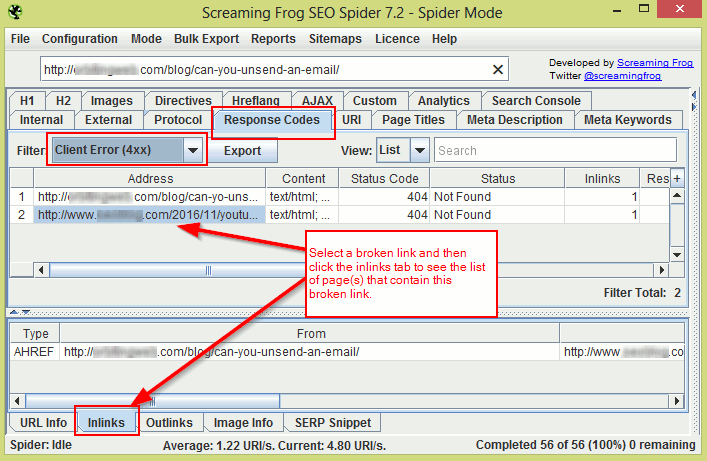
Screamingfrog links checker
 
If you are using WordPress, you can also use a plugin like the Broken Link Checker. This plugin will find and fix all broken links.
Another way to check for broken links is through the Google Search Console. Log in and go to Crawl > Crawl Errors and check for “404” and “not found” errors under the URL Errors section.
If you do find 404 URLs, click on the URL and then go to the Linked From tab to see which page(s) contain this broken URL.

2. Use the site command to check for the presence of low-value pages in the Google index.
The command operator “site:sitename.com” displays all pages on your site indexed by Google.


By roughly scanning through these results, you should be able to check if all pages indexed are of good quality or if there are some low-value pages present.
Quick Tip: If your site has a lot of pages, change the Google Search settings to display 100 results at a time. This way you can easily scan through all results quickly.
An example of a low-value page would be the ‘search result’ page. You might have a search box on your site, and there is a possibility that all search result pages are being crawled and indexed. All these pages contain nothing but links, and hence are of little to no value. It is best to keep these pages from getting indexed.
Another example would be the presence of multiple versions of the same page in the index. This can happen if you run an online store and your search results have the option of being sorted.

Here’s an example of multiple versions of the same search page:
  • http://sitename.com/products/search?q=chairs
  • http://sitename.com/products/search?q=chairs&sort=price&dir=asc
  • http://sitename.com/products/search?q=chairs&sort=price&dir=desc
  • http://sitename.com/products/search?q=chairs&sort=latest&dir=asc
  • http://sitename.com/products/search?q=chairs&sort=latest&dir=desc
You can easily exclude such pages from being indexed by disallowing them in Robots.txt, or by using the Robots meta tag. You can also block certain URL parameters from getting crawled using the Google Search Console by going to Crawl > URL Parameters.

3. Check Robots.txt to see if you are blocking important resources.
When using a CMS like WordPress, it is easy to accidentally block out important content like images, javascript, CSS, and other resources that can actually help the Google bots better access/analyze your website.

For example, blocking out the wp-content folder in your Robots.txt would mean blocking out images from getting crawled. If the Google bots cannot access the images on your site, your potential to rank higher because of these images reduces. Similarly, your images will not be accessible through Google Image Search, further reducing your organic traffic.
In the same way, if Google bots cannot access the javascript or CSS on your site, they cannot determine if your site is responsive or not. So even if your site is responsive, Google will think it is not, and as a result, your site will not rank well in mobile search results.
To find out if you are blocking out important resources, log in to your Google Search Console and go to Google Index > Blocked Resources. Here you should be able to see all the resources that you are blocking. You can then unblock these resources using Robots.txt (or through .htaccess if need be).
For example, let’s say you are blocking the following two resources:
  • /wp-content/uploads/2017/01/image.jpg
  • /wp-includes/js/wp-embed.min.js
You can unblock these resources by adding the following to your Robots.txt file:
  • Allow: /wp-includes/js/
  • Allow: /wp-content/uploads/
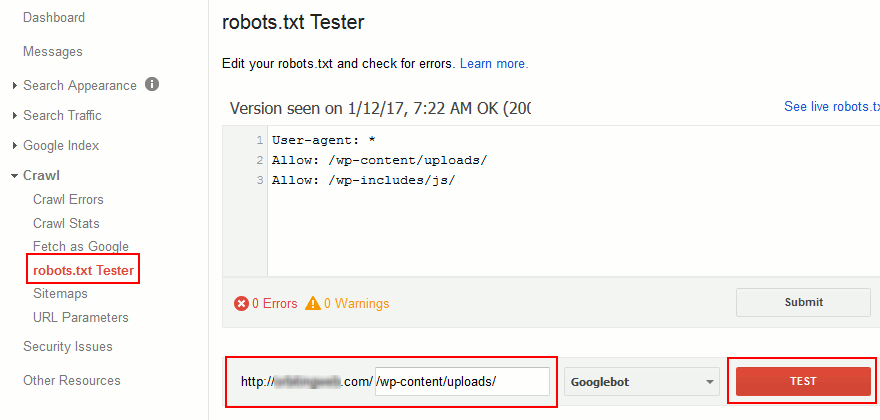
To double check if these resources are now crawlable, go to Crawl > Robots.txt tester in your Google Search console, then enter the URL in the space provided and click “Test”.

4. Check the HTML source of your important posts and pages to ensure everything is right.
It’s one thing to use SEO plugins to optimize your site, and it’s another thing to ensure they are working properly. The HTML source is the best way to ensure that all of your SEO-based meta tags are being added to the right pages. It’s also the best way to check for errors that need to be fixed.
If you are using a WordPress blog, you only need to check the following pages (in most cases):
  1. Homepage/Frontpage (+ one paginated page if homepage pagination is present)
  2. Any single posts page
  3. One of each archive pages (first page and a few paginated pages)
  4. Media attachment page
  5. Other pages – if you have custom post pages
As indicated, you only need to check the source of one or two of each of these pages to make sure everything is right.
To check the source, do the following:
  1. Open the page that needs to be checked in your browser window.
  2. Press CTRL + U on your keyboard to bring up the page source, or right-click on the page and select “View Source”.
  3. Now check the content within the ‘head’ tags ( ) to ensure everything is right.
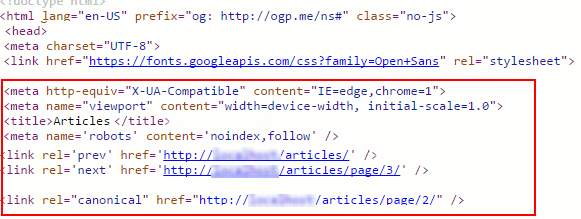
Here are a few checks that you can perform:
  1. Check to see if the pages have multiple instances of the same meta tag, like the title or meta description tag. This can happen when a plugin and theme both insert the same meta tag into the header.
  2. Check to see if the page has a meta robots tag, and ensure that it is set up properly. In other words, check to make sure that the robots tag is not accidentally set to Noindex or Nofollow for important pages. And make sure that it is indeed set to Noindex for low value pages.
  3. If it is a paginated page, check if you have proper rel=”next” and rel=”prev” meta tags.
  4. Check to see if pages (especially single post pages and the homepage) have proper OG tags (especially the “OG Image” tag), Twitter cards, other social media meta tags, and other tags like Schema.org tags (if you are using them).
  5. Check to see if the page has a rel=”canonical” tag and make sure that it is showing the proper canonical URL.
  6. Check if the pages have a viewport meta tag. (This tag is important for mobile responsiveness.)

5. Check for mobile usability errors.
Sites that are not responsive do not rank well in Google’s mobile search results. Even though your site is responsive, there is no saying what Google bots will think. Even a small change like blocking a resource can make your responsive site look unresponsive in Google’s view.


So even if you think your site is responsive, make it a practice to check if your pages are mobile friendly or if they have mobile usability errors.
To do this, log in to your Google Search Console and go to Search Traffic > Mobile Usability to check if any of these pages show mobile usability errors.
You can also use the Google mobile friendly test to check individual pages.

6. Check for render blocking scripts.
You might have added a new plugin or functionality to your blog which could have added calls to many javascript and CSS files on all pages of your site. The plugin’s functionality might be for a single page, yet calls to its javascript and CSS are on all pages.

For example, you might have added a contact form plugin that only works on one page – your contact page. But the plugin might have added its Javascript files on every page.
The more javascript and CSS references a page has, the longer it takes to load. This reduces your page speed which can negatively impact your search engine rankings.
The best way to ensure this does not happen is to check your site’s article pages using Google’s PageSpeed Insights tool on a regular basis. Check to see if there are render-blocking Javascript files and figure out if these scripts are needed for the page to function properly.
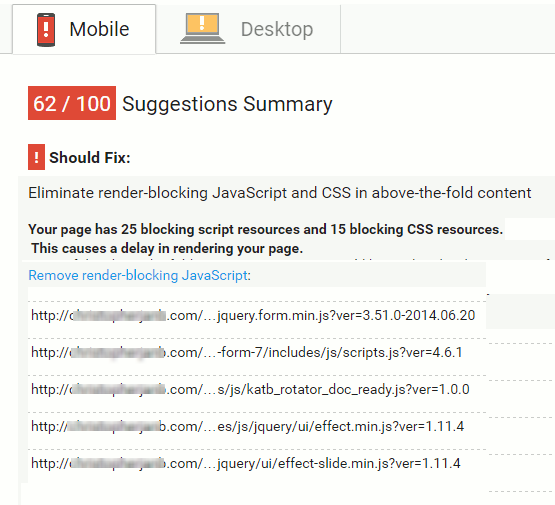

If you find unwanted scripts, restrict these scripts only to pages that require them so they don’t load where they are not wanted. You can also consider adding a defer or async attribute to Javascript files. 

7. Check and monitor site downtimes.
Frequent downtimes not only drive visitors away, they also hurt your SEO. This is why it is imperative to monitor your site’s uptime on a constant basis.
There are a host of free and paid services like Uptime Robot, Jetpack Monitor, Pingdom, Montastic, AreMySitesUp, and Site24x7 that can help you do just that. Most of these services will send you an email or even a mobile notification to inform you of site downtimes. Some services also send you a monthly report of how your site performed.
If you find that your site experiences frequent downtimes, it is time to consider changing your web host.

Things To Monitor For Proper On-Page SEO

These are some very important things to check for so that your on-page SEO stays highly optimized.
Conducting these checks on a regular basis will ensure that your on-site SEO is on point and that your rankings are not getting hurt without your knowledge.
Let me know what kinds of things you check for when doing an SEO site audit. What do you do to make sure your on-page SEO stays optimized? Let me know in the comments below!

Like this post? Don’t forget to share it!
Droidadda is one of worlds best online blogging portal where latest trending articles on Android,Blogging,Seo,Gadgets,Tricks,etc are daily published.
SEO tips and tricks
How to get good search ranking? And How to do a perfect SEO in a blog? These two questions hack the mind of beginners in the blogging journey so for that newbie start running to get some SEO tips and tricks, but after when they are not getting any proper traffic so mostly newbie decide to leave blogging because they think that SEO is a big factor and they can’t understand it properly which is a wrong thinking. Once was a time I also got trapped in these two questions and after that I do lots of research in SEO that what is the proper fact of SEO in search ranking? And How Google reacts with the new Blogs? With lots of article and eBook reading, then I finally know the formula of the inline content strategy of SEO for Google.

Best 15 Workable SEO Tips and Tricks

So in this article, I am revealing my 100% workable SEO tips with you which I learned from different SEO Goudas and Strategist as mentioned below.

1. Create a Sequence of Heading Tags

Yes, it is a first and most important part in search engine rankings that heading tags of your content should be in sequence wisely i.e. Use the first H1 and then use H2 and H3. Mostly newbies ignore this heading sequence and got the very low result in search results because Google bots and spiders firstly analyzed your heading tags that it is in sequence or not.
So first arrange your blog heading tags in your blog theme or template as shown in below image.
Heading sequence tags SEO
Do you Know? Mostly top rated bloggers, set their post title from H1 tag. You can also check it from Screaming Frog SEO spider Tool, this tool will help you to see any web or blog internal SEO structure.

2. Use Listicles OR Bullets in Your Content

Nobody would like a simple and boring article so try to make your content user-friendly. The user-friendly term is not only used for site purity and freshness it also related to user interaction which is a big and most important part of the inline content strategy because if you don’t have good presentation skills so develop it and start doing today by adding eye looking bullets or Listicles in your content.
  • Listicles or bullets increase your content visibility in search engines.
  • It interacts and help users to find his main part of the content.
  • You can increase your content length by using bullets in every paragraph of your content.

3. Use I Instead of We

Try to change your hobby of writing, we in articles if you want to get good results in search engine because if you are a single author and admin of your blog so use I instead of we, the wrong usage of I and we decrease your content quality in front of Google webmasters and it is also important for better user engagement because if you are an only admin and member of your blog according to your blog about us page so how it can be happening that you should have to use it We instead of I.
So always try to use I instead of we in your content and keep practicing to change your hobby for using I instead of we in articles.

4. Use Present Tense Highly

Don’t use future and past tense because you are explaining your own voice in the face of articles in front of readers, which should be in the present tense not in the past or future. It's not meant that you can’t use a single word of past or future tense, you can use past and future where it's needed, but when you are writing an article so always keep in your mind that you have to highly use present tense because you are spreading your own voice in front of the visitor.
Do you know? Every professional Webmasters use’s present tense in a large quantity to create a trusted relationship with Search Engine Engineers.

5. Keep Neat And Clean Your HTML Mode

Nobody would like a dirty thing whether it is a Web robot because fully junk codes create difficult for robots to analyze the next script or code. Let me explain you What is HTML mode? And what is the main effect of HTML in front of search engine robots. HTML Mode is an HTML editor which is on the top right panel just after composing mode, in HTML mode, you can see your all written article cover up in coding which is the main factor for you to analyze that how robots will judge your content in a Search Engine. If your content has many unusual empty spaces, block quotes or others functions so robots easily neglect your article and mark them low-quality content.
So always keep your HTML mode neat and clean and before click on publish check it once the HTML mode for cool relaxation.

Recommended For Bloggers: Is SEO the Only Way to Get Traffic To Your Blog?

Recommended For Bloggers: On-Page SEO Techniques To Rank On The First Page

6. Don't Use Hard Synonyms OR Phrases

If you are running a blog and want to increase readership, so use most easy words in your content because everyone doesn’t have high knowledge to understand difficult synonyms or Phrases. Easy word will decrease your traffic bounce rate and increase readership which is a bright future for your blog.
Mostly every webmaster and SEO strategists use, easy words to explain their lengthy articles like the famous SEO strategist Neil Patel, and it is also beneficial for you to increase the content length because search engine like long and lengthy articles.

7. Decrease Your Page Load Time

Yes, it is very necessary and workable trick to get good search rank on Google, according to Walmart’s research faster load pages get healthy visitors because 90% visitors don’t like to stay on lazy loading pages. This factor is very important for both factors, i.e. Subscribers and for the search engine, so keep your blog instant load if you want to get organic traffic from Google.
Conversion rate page load time
Do you know? Almost 85% successful blogs have page speed within 2secs which is a workable SEO trick to gain high page views from search results.

Recommended: How To Recover from Google Panda Effect ?

8. Don't Use Meta And Description Keyword

It’s another new and important SEO factor using by every second popular blog. Now you don’t need to use Meta and description keyword in blog theme because it will not give you much advantage, let me explain you this important and workable factor that we use meta keyword and description tags to explain robots our main targeted keyword and description of our whole blog in which our all articles are include but you ease the work of search engine robots it meant that robots only promote your those articles in search engine which is totally matched with your main keyword that you are given. 
And on the other way if you don't add these two tags in your blog templates so, then you don’t need to worry about your actual content traffic because when a visitor's search any keyword and if it will be matched with your post title or any single word which is present in your content so search engine highlights your content in good search rank.
So from the above little conclusion, you don’t need to add  Meta keyword and description tags in your blog template because it will kill your upcoming content traffic. You can now see this new SEO factor on every second popular blog by View Page Source as a live evidence.

9. Do Social Promotion Highly

It is an old trick, but its usage is really appreciated by professional webmasters. Social promotion is good for both external and internal link and it creates a good sound for your page rank, checking the popularity of post is also a basic factor for search engine spiders so always promote your post highly on Social Media like Facebook, Twitter and in Google Plus.
SEO social media strategy
Do you know? Google +Plus keeps more importance for Search Engine Ranking than other Social Media Sites.

10. Do No-Follow to External Link

If you are a beginner and don’t want to be confused between Follow and No-Follow, so simply no-follow all external links which are present in your content it meant all other sites except your blog is called external links which may be possible to become harmful for your blog search rankings because if you are a beginner and not know much about do-follow external links so no-follow it and take a breath of safety from algorithms.
Extra Tip: Add your blog homepage link (Do-Follow) inside Footer or show it as a credit link for developing good trust in the eyes of Google bots.

Recommended: HOW TO GET FREE TRAFFIC ON YOUR BLOG OR WE

11. Choose Low Competition Keyword

The biggest mistake of a newbie is a keyword which is the most important factor of Search Ranking because your selectable keyword will decide how much traffic you can get. The keyword has some rules and regulation like if your blog is new so you should have to choose a low competition keyword and if your blog has high page rank so you should have to use the high competition keyword. So always choose low competition keyword for your blog content because it will give you some space for standing in good search ranking.
Extra Tip: Use your main keyword in between 50 characters at starting and ending paragraph of your blog content. It will increase your main keyword interaction in the search engine.

12. Grab Domain OR Hosting Wisely

It is a demandable and the workable trick of SEO strategy to increase high visibility in the search ranking cause of Server Uptime domain hosting. Let me explain you this special SEO factor in easy words that if you will buy a domain from a reputable site whose server speed is very Good so it will be good for your blog because search bots check your domain speed up time for providing you the search rank.
That’s why to grab your domain hosting from very popular sites like Hostgator, GoDaddy or from NameCheap.
Extra Tip: If you don’t have PayPal or master card and you live in an Asian country like Pakistan and India so go with Askforhost and Big Rock these two sites has Good Server Speed and many payment options as you want.

13. Create Your Content Image Unique

Don’t ignore the image traffic if you want to get handsome unique visitors because an image can play a good role for your upcoming visitors, for this, you have to create your content image yourself it is very necessary to get a good image search rank which is a welcome way for your upcoming visitors.
Extra Tip: You can create your content image easily from online websites like from Canva.

14. Break Your Content into Paragraphs

It is good to break your content into paragraphs and it will be better to add H3 or H2 heading tags on every paragraph because it will increase your content quality and also make your content user-friendly for Google Webmasters as well as for your readers.
Extra Tip: In paragraph bold the important words and special steps to increase the quality of content.

15. Increase Your Content-Length

The main and important factor of Search Ranking is the content length, it is necessary to have a quality and lengthy content for high search rank. More words get more visitors is the best line in the SEO content strategy, if you want to get good results from search results, so try to write your content big as much as possible and never forget this valuable line that Content is King so always make your content big and high quality as professionals do.

SEO Cheat Sheet (Content Strategy) 2016

You can download new SEO Content Strategy 2016 cheat sheet from the right-hand side box. This SEO cheat sheet will remind you every important point which is very necessary for content to stand in between top ranks, after receiving a PDF Cheat Sheet just you have to print these two papers and tick it always before pressing publish button for every new content.

Final Words

So this was the SEO secrets which I learned from professionals and it is 100% workable for Blogger users because blogger users don’t have much SEO built in options to increase post visibility in front of Search robots. So follow this SEO tips and tricks to get high visibility in search engine and don’t forget to download the SEO cheat sheet which can help you a lot if you want to get organic traffic from search results. Share this valuable article with your other friend to make them happy for their blogging journey.
Droidadda is one of worlds best online blogging portal where latest trending articles on Android,Blogging,Seo,Gadgets,Tricks,etc are daily published.

The most important aspect in building a successful online presence is to get traffic to your blog. If you have a blog and you are trying hard to get traffic from search engines, i.e. organic traffic, but still you are not able to do it then it’s not your fault.

The cut-throat competition, different algo-updates being introduced have made it quite difficult to rank in SERPs and get organic traffic to your blog.
But is it really required to get traffic from search engines? Can you become successful only if you get traffic to your blog from search engines only?

Also Read: On-Page SEO Techniques To Rank On The First Pageon Search Engine
 

Ways to Get Traffic to Your Blog.
There are many ways to get traffic to your blog. If you have just started to build your traffic, you will face some difficulties in getting organic traffic. But that’s not the end of the road, there are other ways too that can give your blog a good start.

Social Networks are a Boon.
Facebook and Twitter are best traffic sources today for many bloggers. If you are not using these sources, you are losing a big percentage of visitors.
Almost all the people use social networks and if you are not connecting with them there, you will lose the future benefits of having a good social media following.
Also social sharing sites like Reddit and Digg can give you HUGE traffic if your blog post comes on their first page. This traffic can be so large that it can mess up with your servers.

 
Blogging Communities are the Next Big Thing.
Joining blogging communities like BlogEngage, Bizsugar and Blokube can also give you some highly targeted traffic. If you get featured on these sites, you get both, good targeted traffic and also a bump in social following.
Plus with the help of these blogging communities, you can build strong, long-lasting relationships with top bloggers in your area. Such relationships play a very important role in your blogging career.

Other Ways of Traffic Generation.
There are other many ways to get traffic. You can get good volume of traffic by sharing your articles on different content curation sites, becoming active on Forums, commenting on different blog, doing guest posts etc., there are many ways.
So just don’t stop and try out every possible method of getting traffic. Also video marketing has started to take off.

Why SEO is not the only Way to Get Traffic to Your Blog?
By optimizing your blog for search engines, you are creating a very good base for success, but that won’t bring you visitors. By doing SEO for your blog, you make sure that search engines robots notice it and index it, but what about the traffic.
Why it is difficult to get traffic to your blog from search engines? The reason is simple. There are millions of blogs and thousands out of them are authority blogs.
The idea of a post that you are thinking will rank in Google might already be ranking by 100?s of other posts. So beating high-authority blogs is a BIG dream, precisely an exaggeration.
So instead of wasting your time on getting search engines to notice your blog, you must use other sources to get good traffic. If you are successful in building a good social following, your blog is being noticed and shared in different social networks, the search engines will start indexing your posts automatically and you will surely rank for particular keywords competing with the authority blogs.
Other reason is that sometimes you get good organic traffic but that’s not as targeted as the traffic you can get from social networks and blogging communities.
You might have noticed the behavior of search engines that you search for a particular keyword and you get a completely opposite result. So targeted traffic is not always possible from search engines.
So my personal suggestion would be to concentrate on building a good social media following, building new relationships, doing some guest posts on high quality blogs and without your effort, without any SEO you will get traffic to your blog.
Hope you like it. Happy Blogging.

Also Read:
Droidadda is one of worlds best online blogging portal where latest trending articles on Android,Blogging,Seo,Gadgets,Tricks,etc are daily published.
Want to make your post keyword-targeted, SEO-optimized, and ready to drive more traffic?
Would you like to make it easier for search engines to understand what keyword(s) your blog should rank for?


If you answered “yes” to any of these, then you are about to learn the secrets of making your blog post keyword-targeted.
When it comes to optimizing a website or a blog post, there are two main factors at play:

  1. On-page optimization
  2. Off-page optimization
Today’s article will focus on on-page optimization, and I will be sharing lots of good on-page SEO techniques you should implement while working on optimizing your blog posts.
Now, let’s not confuse on-page SEO-optimization with onsite SEO-optimization.

  • Onsite SEO refers to the optimization of the entire website with things like sitemapping and setting permalink structures.
  • On-page SEO optimizes content for a target keyword within a single blog post. This includes using proper headings, proper keyword placement, ensuring content quality, and paying attention to many other factors.

Why Do You Need On-Page Optimization?

Now, when some bloggers hear the term “SEO-optimized articles”, they think this is some kind of bad practice.
But it’s not only not bad, it’s necessary.
Here’s what Harsh had to say about his effort to recover from Google Panda:

Search engines are nothing but a set of algorithms. They look into various factors to rank your page for certain keywords. Now, we need to help search engines identify that target keyword from the post in order to make that post more relatable to readers.
Here is some food for thought:

  • Why are you not ranking on the first page of search results?
Well, there are likely a lot of reasons, but if you aren’t paying attention to SEO, then that’s probably the biggest reason.
So when we do SEO-optimization of a post, we follow a certain set of proven methods to rank it higher on a search engine.
Now, Google doesn’t only consider on-page SEO score when ranking an article. It also takes into account many other factors like social media signals (shares, likes, tweets, follows, etc.), backlinks, domain authority, and many other off-page metrics.
Our goal with on-page SEO is to optimize an article in a natural, but smart way, so that search engines can easily pick out the target keyword and bring our website targeted visitors.
Before you read more, I assume you know about keyword research and how to find keywords to target. If not, check out these posts:


According to Searchmetrics, here are the latest search engine ranking factors:

on-page seo ranking factors

As you can see, a lot has changed over the past several years. While you can clearly see from this infographic that off-page SEO is important, on-page SEO should not be neglected.
In particular, the golden rule still applies:

  • Content is king.
One thing which I would recommend you start doing is adding in videos to your blog posts. Videos will not only increase the amount of media on your posts (which will engage users), it will also make your posts that much more informative and content-rich.
You’ll see an example of what I’m talking about in a minute.

10 On-Page Optimization Techniques For Better Ranking in 2017

Before I share some specific tricks, here are a few non-technical things that you can incorporate today:

  1. Improve user experience.
    • Make sure your website is responsive and broken links are kept to a minimum.
  2. Ensure that readers coming from search engines spend a lot of time on your site. If they hit the back button quickly, your ranking will drop quickly too.
    • Make sure your site is maintaining a standard of professionalism.
    • Use proper copywriting techniques to make people stick around.
  3. Create good content.
    • Try using benefit-driven sub-headings to be more engaging.
    • Don’t write fluff.
    • Seek feedback and improve.
So now I’ll share with you the 10 on-page optimization factors you should keep in mind while optimizing your blog posts.

1. Blog Post Title
This is the most important on-page SEO factor. The reason for this is because the more attractive and optimized your title is, the more people will click. And in general, the more clicks your post gets, the higher it will rank.
You should try to use the targeted keyword or phrase toward the beginning of title (H1) tag, but if that’s not possible, make sure it’s at least somewhere in the title.
You should also not repeat the same keyword more than once in the title tag because you think it will help the article rank higher. It won’t. It could actually hurt your ranking. Don’t do it.
And keep the title length to under 65 characters.
For more on how to write a great title, check out:


2. Post Permalink Structure
Making sure your URL is displayed correctly is an important on-page metric. Again, you should use your target keyword in the URL, and avoid using special characters, symbols, brackets, commas, etc. within the actual URL.
Use dashes to differentiate the strings in your URL structure. These are called “pretty” permalinks and are supported by most web browsers.
Example of a good permalink:

  • https://www.domain.com/post-title-separated-with-dashes
For more on permalinks, check out:

3. Heading Tags
You should use heading tags to highlight various headings, sub-headings, and important points.
In WordPress, the title tag is set at H1. You don’t really need to use any more H1 tags anywhere in the article. One is enough. For section breaks, stick to H2 and H3 tags.
Also, don’t use too many H2 or H3 tags as Google’s algorithms won’t like that.
Here is what Google’s Matt Cutts has to say about repeating heading tags:


4. Keyword Density
You should keep the keyword density around 1.5% percent with a mix of LSI keywords. But as Matt Cutts explains in the video below, there is no real magic formula.
Use your main keyword once in the first paragraph and again in the last paragraph. And use it in the content where it makes sense.
Check out:

Here is Matt Cutts again:


5. Meta Tags
You should add a unique and relevant meta description with each blog post.
Again, you should use your use targeted keyword in the meta description, but don’t keyword spam your description. While search engines pick up on keywords, it’s also important for users to click on the post. You need to write user-friendly meta descriptions that make sense and are related to your post.
With regards to meta keywords, Google has made it clear that they don’t care about them. But some search engines, like Bing, may still care a little.
Here is the official statement from Google regarding meta keywords:


6. Images
Image optimization does help a lot in driving traffic from image searches.
Keywords in the “image title” and the “alt text” help to make your blog post more focused and targeted.
But more important than that:
Images create engagement.
And the more engaged a user is, the more likely they’ll stick around, thus increasing your overall rank.
But there’s one very important point to note. Large images will slow down your site, and having a slow loading site will decrease your Google rank. So it’s very important to:


For more on images, check out:

7. Word Count Per Post
Blog posts that don’t have a lot of words typically don’t perform well on search engines. That’s because they’re usually seen as being “less informative”.
Ofcourse there are exceptions, but for a general information-based blog, creating posts with at least 500 words is pretty standard.  
It’s always better to be well-researched and overly informative than it is to not provide enough information. This is especially true if you’re targeting highly competitive keywords.

Suggestion: Analyze other posts for your target keyword and see how many words they have.
While there is no “official” count, longer posts tend to rank better because there is typically more information there. For instance, this post is over 2,000 words.
But be careful not to over do it.
For more on writing informative content, check out:

8. Internal Linking
Place links to related posts from your blog inside of your blog posts.
Interlinking of blog posts will help your blog readers spend more time on your blog, and it will also help pass page rank to other pages of your site.
When interlinking, try to use a keyword as the anchor text, but be very careful not to overdo it.
Internal links that are relevant to the original post show search engines that you are providing extra information beyond what is being displayed in the content.
But make sure your interlinking is relevant and necessary.
For more on interlinking, check out:

9. External Linking
Apart from linking to your own blog posts, it is a great idea to link out to external websites as well. Again, only do this if the information on the external website is relevant to the information in your post.
While linking out to external websites, you should link to trusted websites only. And if you have doubts about the authority or popularity of a website, you can use a nofollow tag to avoid passing your link juice to potentially bad sites.
You should use dofollow links for trusted websites and nofollow links for those that are less trustworthy.
But somewhere authoritative like Wikipedia, or CNN, or a major player in your niche, will not only be trustworthy, they’ll likely have relevant content that your readers will love.
This will make your site appear more credible.


10. Write Engaging Content
You should write engaging content. Period.
If you’re trying to get by with low-quality content and “trick” search engines, you will surely fail.
Your post should be a complete manual for that keyword. You should learn how to engage your audience in a way that works for them. Try asking your readers questions and answering them. Understand what they want to read, and then write that.
If you are unable to write engaging content, people will not spend much time on your blog, your bounce rate will increase, and your rankings will plummet.
For more on creating great content, check out:

On-Page SEO Checklist:
Here is a checklist you can use to make sure you are doing everything possible to rank higher in search engines.
Keyword placement:

  • Keyword in title.
  • Keyword in permalink.
  • Keyword in first paragraph.
  • Keyword in image alt tag.
  • Use LSI keywords in body (use SEOPressor plugin to find related keywords).
  • Use LSI keyword in H2 or H3.
  • Shoot for around a 1.5% keyword density.
Other things:

  • Remove all stop words from permalink.
  • Add multimedia (video, slides, infographics).
  • Minimum 500 words.
  • Optimize images before uploading (compress and resize).
  • Optimize page load speed.
  • Create a meta title less than 65 characters.
  • Create a meta description less than 150 characters.
  • Internal links to related articles.
  • Outbound links to relevant high-quality sites.
Other things not mentioned here:

  • Make sure to add an image for Facebook, Twitter, etc.
  • Make sure to have social sharing buttons either at the end or floating on the site of your post.
  • Have related posts after each post to lower down bounce rate.
Things not to do:

  • Don’t put more than one H1 tag (your post title is H1).
  • Don’t repeat the same H2 and H3 tag. 
  • Don’t stuff keywords.
Things to focus on:

  • Use your keyword in the post title.
  • Use long tail keywords.
  • If writing in an evergreen niche, remove dates from the posts. (Use Date Exclusion SEO plugin.)
  • Content length: The longer the content, the better it probably is. But don’t try to needlessly increase the content length.
  • At the end of blog post, ask users to take action.
Here are the last year SEO trends by Midasmedia:
SEO trends 2016

How To Do Proper On-Page SEO Of Blog Articles

So these are 10 tips that will help make your on-page SEO much better and more likely to rank on search engines.
But it’s important to remember:
You can’t trick a search engine. 
The things that rank the highest are the things that are the most informative, the most engaging, and the most useful. So strive to create content that readers love, and search engines will love you too.
What are your tips for optimizing blog posts? Share them with me in the comments below!
Like this guide? Don’t forget to share it!